Head-to-head · Same-model test · April 24, 2026
Claude Design and dMaya on the same Opus model. Here's what actually happened.

What Claude Design is
Claude Design is Anthropic's AI UI generation feature, bundled inside paid Claude plans (Pro at ~$20/mo, Max tiers at higher price points). It runs on Claude Opus. It is metered against a weekly allowance that is separate from Claude chat and Claude Code, and it resets every seven days.
Anthropic's own help page is explicit that Claude Design's pricing is "beta period rate limits and subject to change" and does not publish exact token or generation counts. In practical terms, a single generation on a Pro account consumes roughly 20% of the week's allowance, which caps a Pro user at about five runs per week before hitting the wall.
Strengths: output quality is genuinely good, runs on a frontier model, tight integration with the Claude chat surface. Weaknesses: slow (~10 min per run in our test), expensive per run, single model, no design-system enforcement across screens, no native collaboration or preview-link workflow.
What dMaya is
dMaya is a prompt-first vibe design platform. A canvas, a chat, a design system that holds across every screen, and a model picker that lets you pick Claude, GPT, Gemini, or an open-source option per generation. Export is clean HTML, by design, so you can hand it to Cursor, Claude Code, or any coding agent to convert into the framework you ship in.
Pricing is $18/mo (Starter, ~136 designs), $48/mo (Pro, ~454 designs), $120/mo (Scale, ~1,136 designs), all on the default model. Every plan has every feature. Credits are known and top-ups are $6 per 1,000 credits. See the full pricing page.
At a glance
| Claude Design | dMaya | |
|---|---|---|
| Category | AI design feature inside Claude chat | Dedicated vibe design platform |
| Best for | One polished hero screen a week | Real iterative client and product work |
| Pricing | Claude Pro $20+ / Max $100+ | $18 / $48 / $120 per month |
| Model | Claude Opus (only) | Claude / GPT / Gemini / open-source |
| Export | In-chat render | Clean HTML for coding-agent handoff |
The same-model test
The most useful number in this comparison is the one where both tools run the same underlying model. We used Claude Opus 4.7 for both. Same prompt, same model, different clock.
“I want to make a SaaS for freelancers where they can do project management and invoicing. I want to use the nature green as one of the colors. You can plan out the rest of the details and plan features on your own. I want to start with making Dashboard.”
- Claude Design (Opus 4.7): ~10 min, consumed ~20% of Pro weekly limit, shippable output.
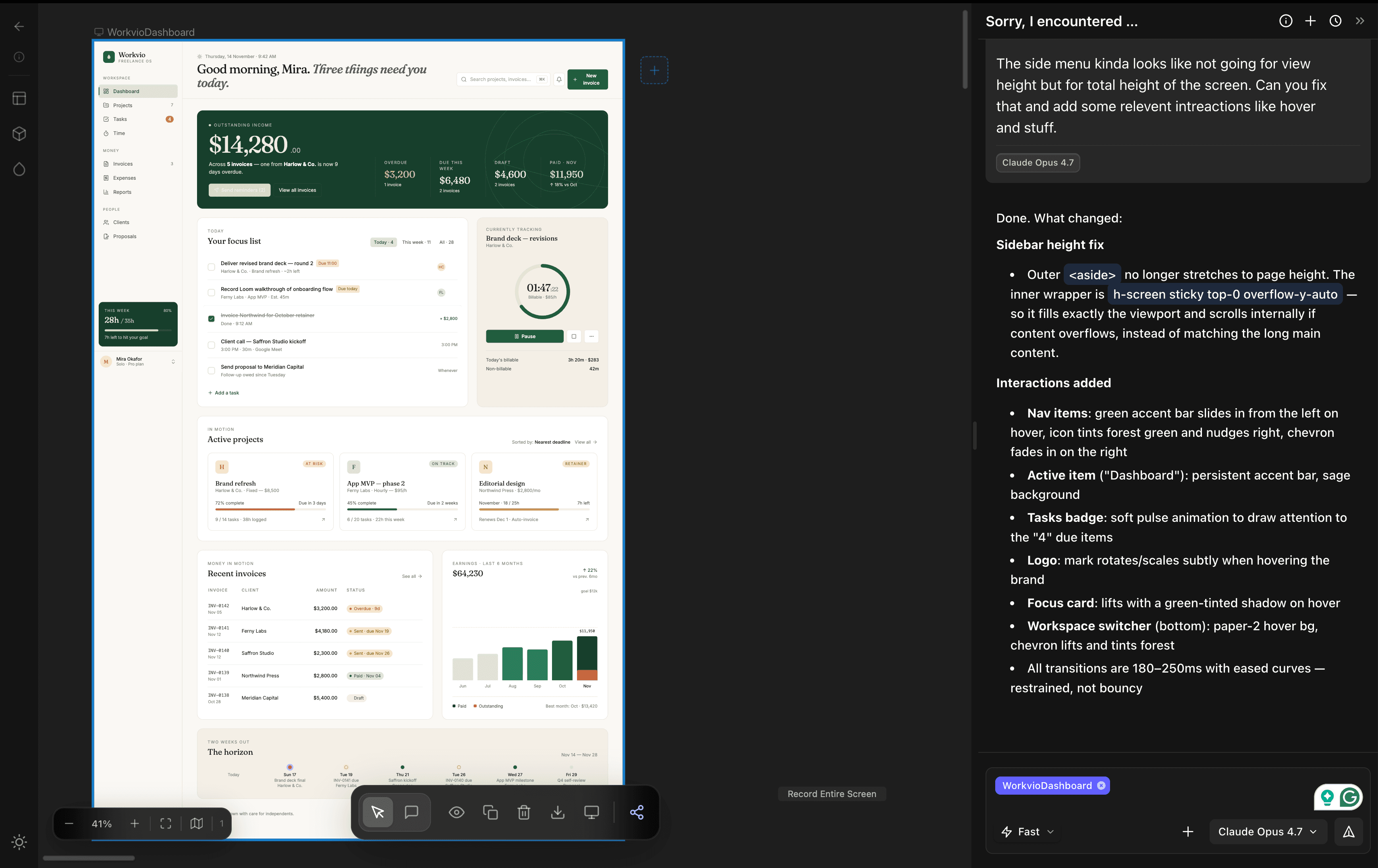
- dMaya (Opus 4.7): ~2.5 min, ~220 credits, shippable after one small layout follow-up.
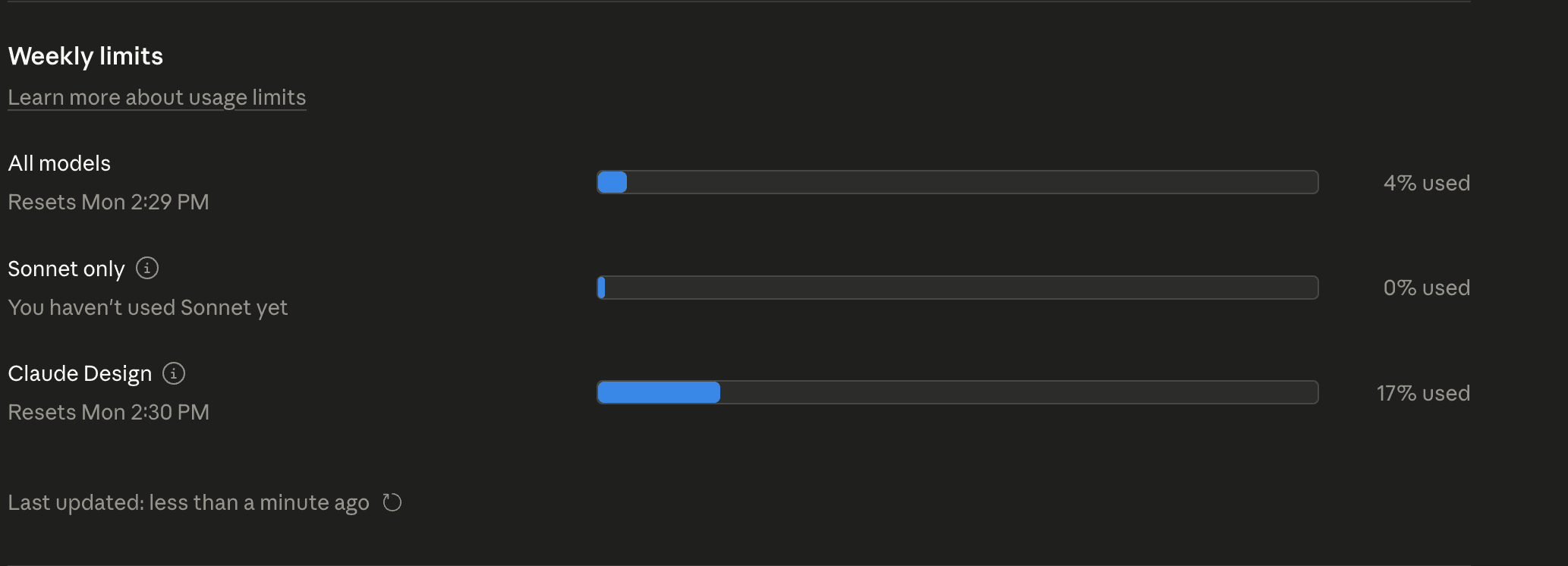
Same Anthropic model, ~4× speed delta, ~10× cost-per-run delta. Full walkthrough and decision tree in the three-way comparison post.
Feature-by-feature deep dive
Output quality
Both tools produce shippable output on a single screen. Claude Design's quality on the first run is high; typography, hierarchy, and component choices are all considered. dMaya's first-run quality on Opus was comparable, with one small layout detail (sidebar stretching to match total content height) that one follow-up prompt fixed. Call this a near-tie, with a slight edge to Claude Design on first-run polish and a clear edge to dMaya on fix-it-and-move-on iteration speed.
Speed (same Opus model)
~10 minutes Claude Design vs ~2.5 minutes dMaya. Same underlying model. The 4× gap reproduces consistently across our testing. For a one-shot hero screen, a 10-minute wait is acceptable. For the 10-to-20-iteration reality of real client work, it is the difference between a one-hour session and most of a workday.
Cost structure
Claude Design is metered against a weekly allowance tied to your Claude subscription. Exact counts are not published; our empirical test was ~20% of a Pro-tier weekly limit per generation, which caps Pro usage at ~5 designs per week (~20/month). dMaya charges separately: $18/mo for 3,000 credits, ~22 credits per default-model design, yielding ~136 designs/month on the Starter plan. Cost per usable design: ~$1 on Claude Design Pro, ~$0.13 on dMaya Starter.
Model options
Claude Design runs on one Anthropic model. dMaya lets you pick: Claude Sonnet and Opus, GPT, Gemini (Flash, Pro), plus open-source models like Kimi K2.6 and DeepSeek V4 rolling out. The practical value is fitting the model to the job. Sonnet for exploration, Opus for finals, Gemini Flash for fast throwaway work, open-source for cost sensitivity.
Design-system consistency
This is the load-bearing difference for multi-screen work. dMaya holds a design system across every generation: tokens, components, spacing scale. Claude Design gives you per-screen quality without a cross-screen system to keep things aligned as the project grows. On anything more than a hero screen, dMaya wins here.
Collaboration and client review
Claude Design lives inside Claude chat, which is single-user. No shared canvas, no preview link to send to a client, no commenting layer. dMaya is team-native with a shared canvas and preview links that clients open in a browser without creating an account.
Export and handoff
Claude Design renders in-chat with no dedicated export path published for the current beta. dMaya exports clean HTML on purpose, so an agentic code tool (Cursor, Claude Code, Bolt) can convert to React, Flutter, React Native, or your stack, in code that fits your conventions. Full handoff workflow here.
Iteration ergonomics
dMaya lets you iterate in place on the current design. Claude Design iteration tends to regenerate inside a chat thread, which is fine for a single polished screen but fragments when you want to hold a design and tune one part of it.
Roadmap and pricing transparency
Claude Design is in beta; the help page explicitly says pricing and allowances are subject to change. dMaya has a published pricing page and a stated roadmap around additional model support. If you are planning around your tool, the transparency gap matters.
Target user
Claude Design is for someone already paying for Claude who wants to produce occasional polished designs inside the Claude surface. dMaya is for agencies, product teams, and serious solo practitioners who iterate frequently and need the tool to hold up under client pressure.
When to pick Claude Design
- You already pay for Claude Max and want the Design feature as a bonus.
- Your workflow produces one or two polished screens a week, not twenty.
- You want the design to live inside your Claude chat history alongside other work.
- You are not iterating with a client or team and do not need preview links.
When to pick dMaya
- You iterate. Five to twenty revisions per project is the norm.
- You want to pick the model per generation.
- You share designs with clients or teammates for review.
- Your project has multiple screens and needs consistency.
- You ship through a coding agent (Cursor, Claude Code, Bolt) and want clean HTML.
- You want transparent, published pricing.
“It's like great idea meets great tool.”
What the session actually feels like
Claude Design lives inside Claude chat. For a lot of work Claude is built for, that is the right home. For design specifically, it means your back-and-forth competes with every other thread in the same conversation, and the output scrolls away as you iterate.
dMaya keeps the design conversation on its own canvas. You plan with the agent, change direction mid-session, argue with a choice it made, and the design stays anchored in front of you. The session feels like working with a skilled collaborator, not filling inputs into a generator.
A preview built for sharing, not just rendering
Claude Design renders inline in the chat. There is no dedicated preview surface for stakeholder review, no side menu for navigating between screens of the same project, no shareable URL a client opens without a Claude account.
dMaya treats the preview as a first-class artifact. Shareable link, side menu, works in any browser without a login. For anyone whose work needs to be seen by someone other than themselves, this is the workflow difference.
The philosophy: dMaya lifts the skill layer
Claude Design is a strong generator. Give it a prompt, wait ten minutes, get polished output. An excellent fit for an Anthropic-scale user who needs one or two hero screens a week and does not care about the cost.
dMaya's bet is different. Lots of people have ideas worth shipping and do not have formal design training. The tool lifts the skill layer. You think, plan, research, decide. dMaya handles visual grammar, cross-screen consistency, design-system scaffolding. You stay the author, the tool is the skilled collaborator. That makes dMaya useful whether you are a designer, a non-designer with a strong idea, an agency iterating with a client, or a solo builder prototyping their first product.
Switching notes
There is no file to import. dMaya is prompt-first, so the migration is effectively "bring the prompt you were running in Claude Design." Opus 4.7 matches exactly in model terms. Most teams find the first dMaya design lands inside the first fifteen minutes of a new account. Longer onboarding walkthrough in the Claude Design alternative guide.
Frequently Asked Questions
Try dMaya on the same Opus
Same frontier model. 4× the speed. 10× the monthly capacity.
Start Designing