AI Design Workflows · 2026 Guide
What is Vibe Design?

Vibe design came into focus as a term in 2026. Google Stitch got a major overhaul on March 19 that sent Figma's stock down 8% in a day. Anthropic launched Claude Design shortly after. The AI-native design category stopped being a rumor and became a shopping decision.
But the term has been used loosely. Some writers collapse it into vibe coding, some tie it only to Google Stitch, some use it to mean "AI helped me in Figma." This post draws a cleaner line. What vibe design is. What it is not. How a real session goes. And where it is the wrong tool to reach for.
What vibe design is
You open a project, describe what you want in plain English, and a canvas fills in with a real UI design. Not a wireframe. Not a single static image. A layout with typography, colors, spacing, components, and responsive behavior, tied together by a design system that stays consistent across every screen you generate after it.
From there, you iterate by talking. Change the palette. Tighten the hero. Add a mobile variant. Swap the sidebar for a top nav. It is a conversation with a canvas, not a toolbar and a manual.
When the design lands, you share a preview link. A client or teammate opens it in their browser without creating an account, leaves a comment, and you iterate. When the design is approved, you export clean code and hand it to your developers or a coding agent like Cursor or Claude Code to build in whatever framework you ship in.
What vibe design is not
Four adjacent categories get confused with vibe design. Drawing the line matters, because the workflows are genuinely different.
It is not vibe coding
Vibe coding (Cursor, Claude Code, Bolt, Lovable) outputs code. You get a running app. Vibe design outputs a visual. You get a canvas you approve before a developer writes anything. Same kind of prompt, different artifact, different workflow.
It is not wireframing
Wireframe tools (Balsamiq, Visily at low fidelity, Excalidraw) produce intentionally rough sketches meant for alignment, not presentation. Vibe design produces production-grade output you can show to a paying client on the first try.
It is not Figma AI
Figma AI adds AI assistance on top of a manual design tool. The canvas still starts with pixel-pushing muscle memory. Vibe design tools are prompt-first. The canvas starts empty and conversation fills it. Different posture, different user.
It is not image generation
Midjourney, DALL·E, and friends produce a picture of a UI. Vibe design tools produce a working layout: real components, real tokens, real responsive behavior, editable like a design file, exportable as code. A picture is decorative. A vibe design is operational.
How a real vibe design session goes
Six steps, in order. This is what the last three months of running dMaya with real agency projects has settled into.
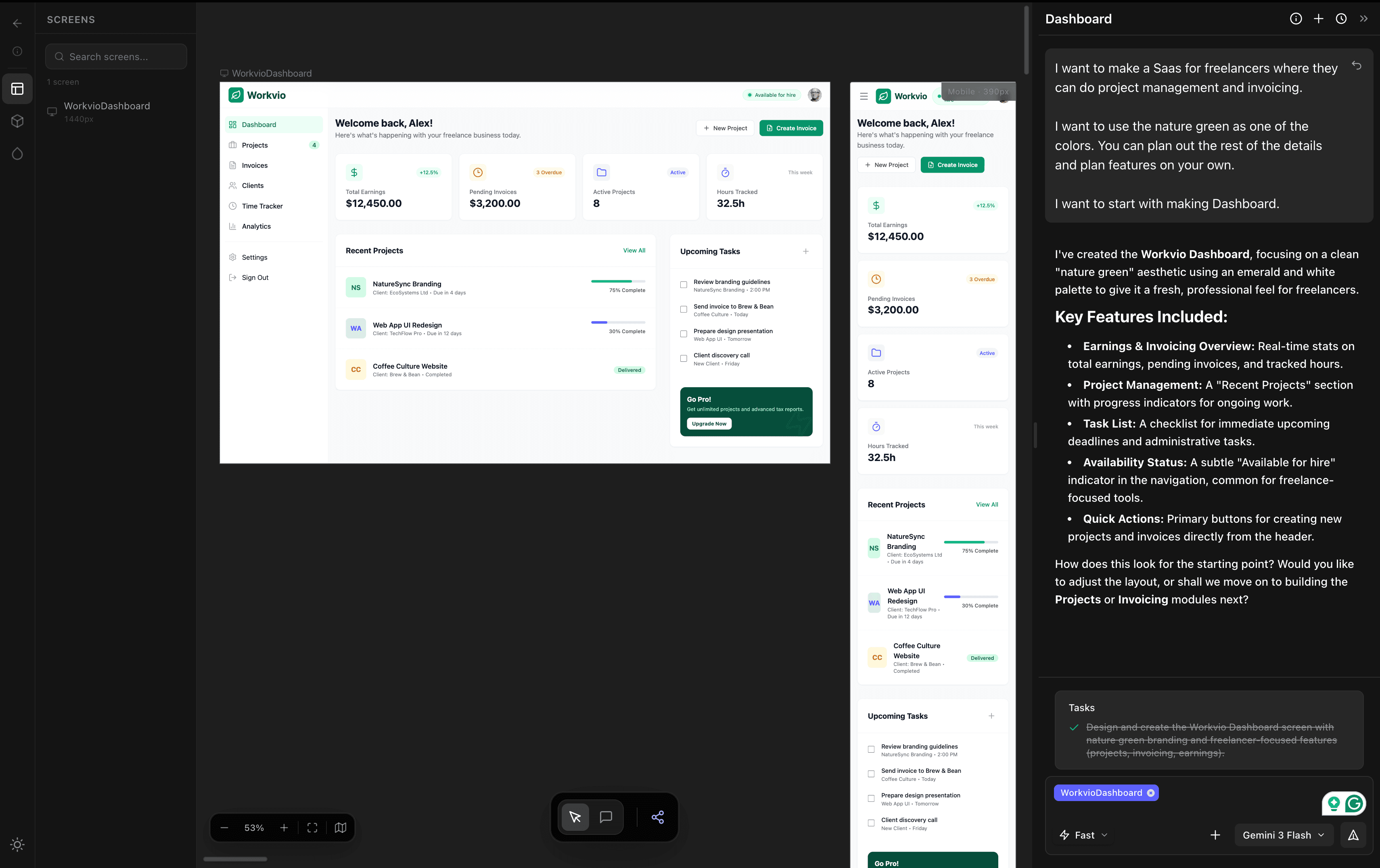
- 1. Describe what you need. One paragraph is plenty. Audience, purpose, one or two constraints ("use a nature green as one of the colors", "start with the dashboard"). You do not need to specify components, spacing, or a design system up front. The AI picks reasonable defaults you can override later.
- 2. Let the canvas fill in. The first draft lands in roughly two to three minutes on a mid-tier model. You get a full layout on a canvas, not a single exported image.
- 3. Watch the generation, then review. This is what it actually looks like in dMaya, running Claude Opus 4.7:
- 4. Iterate by chatting. In dMaya, you can also pick a different model per generation. Faster and cheaper for exploration, higher-fidelity when the screen has to go in a client deck. Claude, GPT, Gemini, and open-source options all live in the same tool.
- 5. Share a preview link. Clients open it in their browser with no login. They leave comments inline. You keep iterating. The loop tightens from "schedule a review meeting" to "refresh this link in two minutes."
- 6. Export clean code. Once approved, you export HTML and hand it to Cursor or Claude Code to convert into React, Flutter, React Native, or your stack. Design-to-code export is the handoff. Your existing developer workflow continues from there.
The load-bearing idea: design systems enforced by default
Here is the claim most writing on vibe design glosses over. The thing that makes vibe design work for real, multi-screen projects is that the tool holds a design system across every generation. Same tokens. Same components. Same spacing scale. Every screen you generate after the first one has to live inside that system.
This is what vibe coding tools cannot guarantee. When Bolt or Lovable builds your second screen, the AI makes a fresh set of visual choices. Colors drift. Buttons change shape. Spacing varies. By screen twenty, it looks like twenty different people built it.
Vibe design's main contribution to the workflow is not speed. It is consistency under growth. If your project has more than five screens, this is the thing that decides whether the tool was worth using.
What this actually looks like against the alternatives
We ran the same prompt through dMaya, Google Stitch, and Claude Design on one afternoon and recorded the time, the cost, and the output. Headline numbers: dMaya on Opus 4.7 produced a usable dashboard in about 2.5 minutes. Claude Design on the same Opus model took about 10 minutes and consumed roughly 20% of the weekly Claude usage limit in a single generation. Google Stitch was fast but the output was not shippable.
Full breakdown with all four videos, stat strips per tool, and the decision tree is in the same-prompt comparison post.
Common moments where people reach for vibe design
You do not have to be any of these to use a vibe design tool. If you are new to the concept, you will probably find yourself in one of these scenarios soon enough. And if you are not in any of them, the tool still works for you. Nothing about this is gated to a job title.
The live client call
An agency PM who used to hold the client call while a designer cooked a mockup in the background, now generates the first pass on the screen during the call and iterates on feedback in the same hour.
Validating an idea before engineering
A founder who wants to see and feel the product before hiring a developer or spending on a codebase. Vibe design produces something real enough to show to users and investors before a single line of code is written.
Exploring three directions in an afternoon
A product team that would normally pick one UI direction to build and hope, instead generates three and shows the team. Picking from a plate beats betting on a guess.
Pitching more projects without sacrificing fidelity
A freelancer who could only afford to pitch one concept at a time is now sending three polished mockups by end of day. Win rate goes up, spec time does not.
Or any other moment where you have a better sense of what you want than the tools you have let you express.
When vibe design is the wrong tool
Being honest about this matters. A few cases where vibe design is the wrong thing to reach for:
- Brand work where every pixel has to reflect a hand-crafted identity. Vibe design can generate a strong start, but the final polish is manual taste work.
- Very bespoke interactions (custom gestures, unusual animation logic, novel UI primitives). AI generates the common patterns well; it does not yet invent new ones.
- Print and physical collateral. Vibe design tools produce digital UI. Packaging, ads, and print stay in Illustrator and Photoshop.
- Projects where the constraint is not speed. If you already have a designer and a six month timeline, the main benefit goes unused.
Tools for vibe design
Three tools currently hold the category. We ran the same prompt through all three; the short version is here.
- dMaya. Prompt-first canvas with design-system enforcement. Model choice per generation (Claude, GPT, Gemini, open-source options rolling out). Built for anyone shipping real design work, from agencies and product teams to solo builders with an idea.
- Google Stitch. Free in Google Labs, runs on Gemini (Flash or Pro). Useful for quick exploration. Output is not shippable for real client work.
- Claude Design. Anthropic's vibe design feature, runs on Claude Opus. Good output, but roughly 10 minutes per generation and ~20% of a weekly Claude limit per run. Not practical to iterate on.
Vibe design vs vibe coding, in one paragraph
Vibe coding outputs code and a running app. Vibe design outputs a visual on a canvas that stakeholders can approve before development starts. For solo developer projects, vibe coding is often the right reach. For client work, product teams, and anyone who answers to stakeholders, vibe design fits the workflow cleanly. Full comparison here.
Frequently Asked Questions
Try a real vibe design session
Describe what you want. Watch a canvas fill in. Export clean code when you're happy.
Start Designing