Head-to-head · Tested April 24, 2026
We ran the same prompt through Google Stitch, Claude Design, and dMaya.

Three AI design tools. One prompt. Four generations, because dMaya runs multiple models and we wanted to see the spread. What follows is the video of each run, the time on the clock, the cost on the meter, and an honest verdict for each. Yes, we build dMaya. The data still stands on its own.
The prompt (identical in all three tools)
I want to make a SaaS for freelancers where they can do project management and invoicing. I want to use the nature green as one of the colors. You can plan out the rest of the details and plan features on your own. I want to start with making Dashboard.
How we ran the test
- · Same prompt, word for word, into each tool.
- · No priming, no follow-ups (dMaya got one follow-up to fix a layout bug, noted below).
- · Timer started on submit, stopped when the tool marked the generation complete.
- · Cost recorded in whatever unit the tool uses (credits, weekly-limit %, etc).
- · Verdict written after the run, not before.
1. Google Stitch (Gemini Flash or Pro)
Stitch is fast. That's the first thing and the best thing we can say about it. Around two minutes from submit to output, whether you run Gemini Flash or Pro. The problem is what comes out the other side. On our prompt, the generated dashboard was not something you could show a client, not something you could iterate on into production, and not something a developer could pick up and ship. It is a preview of the idea of a dashboard, not a dashboard.
For quick exploration of a visual direction with zero cost and zero commitment, Stitch is fine. For a real client project, the output will cost you more in cleanup than starting somewhere else would cost you up front.
Verdict: Free, fast, and largely decorative. Use it to sketch, not to ship.
2. Claude Design (Opus 4.7)
Claude Design produces a design you could actually ship. The composition is considered, the typography looks intentional, the component patterns are consistent. On output quality alone it is the strongest of the three.
Then you check the clock. Ten minutes for one dashboard. Then you check your Claude subscription meter: that single generation ate about 20% of our weekly usage limit. You do the math on iteration. Two runs a day for three days and your Claude account is out of rope until next week. Iteration is where design actually lives, so a tool that makes the second run painful is a tool you can only run once.
Verdict: Good output. Too slow and too expensive to be practical. You get one polished run before the meter punishes you, and design is an iterative job.
3. dMaya (Claude Opus 4.7 and Claude Sonnet 4.6)
Same prompt, same Opus 4.7 model that Claude Design uses, different result on the clock: roughly 2.5 minutes end to end. The first output was essentially correct. One detail needed a follow-up: the left side menu was stretching to match the page's total content height. One prompt fixed it. After that, the dashboard was something we could hand to a developer and ship.
We also ran the same prompt on Sonnet 4.6, because dMaya lets you pick the model and that is the thing nobody else in this comparison can do. Sonnet was faster, cost roughly half in credits, and for this kind of dashboard the output was very close to the Opus run. For client work where you're iterating five or ten times to land on the right direction, Sonnet is the pragmatic default; Opus earns the call when the fidelity has to be highest.
Verdict: The only tool in the test where cost, speed, and output quality all land in a place that's economically iterable for real client work.
The thing nobody else in this comparison does
Claude Design runs on one Anthropic model. Google Stitch runs on Gemini (Flash or Pro). That's the whole menu each one hands you. dMaya hands the choice to you: Claude (Sonnet, Opus), GPT, Gemini (Flash, Pro), and open-source models like Kimi K2.6 and DeepSeek V4 rolling out. Frontier commercial models from all three big labs and the strongest open-source options, all in one tool.
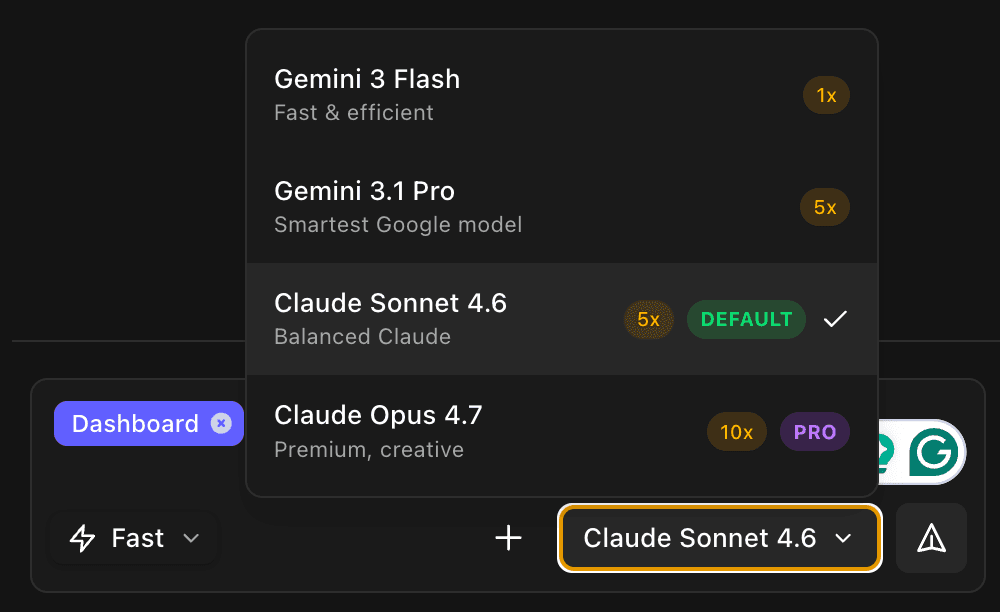
This matters more than it sounds like it matters. Different models are honestly better at different jobs. Sonnet is fast and cheap and right for the first eight versions of anything. Opus is slower and pricier and right for the screen you're about to put in a client deck. Gemini Flash is a different thinker entirely and sometimes lands a layout the Anthropic models miss. Being locked to one model is a tax you pay on every generation you didn't need the best model for.
Head to head
| Google Stitch | Claude Design | dMaya | |
|---|---|---|---|
| Time (same prompt) | ~2 min | ~10 min | ~2.5 min (Opus) |
| Cost per run | Free (Labs) | ~20% of weekly Claude limit | ~220 credits (Opus) / ~110 (Sonnet) |
| Model choice | Gemini Flash or Pro | One Anthropic model | Claude + Gemini + open-source, you pick |
| Output quality | Not usable for client work | High, shippable | High, shippable after one follow-up |
| Iteration fit | Fine, nothing to iterate on | Painful at real volume | Economically viable |
| Best for | Throwaway sketches | One polished hero screen | Real client or product work |
Which one should you reach for
One more thing worth noting
All three of these tools sit in the vibe design category (prompt in, UI out). If you're trying to figure out whether you even want this kind of tool in your workflow, or whether a vibe coding tool like Bolt or Lovable or Cursor fits better, read that one first.
If you already know you want design-first, the next practical questions are code export and handoff. dMaya exports clean HTML you hand to Cursor or Claude Code to convert to React, Flutter, React Native, or whatever your stack is. See how the export works or read why dMaya for the broader case for design-first AI workflows.
For readers specifically evaluating one of the three tools in this test, we have focused pages that go deeper on each: Google Stitch alternative, Google Stitch vs dMaya, Claude Design alternative, and Claude Design vs dMaya.
Frequently Asked Questions
Run the same prompt on dMaya
Pick your model. Get a design you can ship in minutes, not hours.
Start Designing