Comparison · Tested April 2026
Looking for a Claude Design alternative? Here's the short answer.

Claude Design's output is good. That is not the problem. The problem is the economics of iteration. Design is not a one-shot job, it is a 10-to-20-iteration job, and a tool that makes the second run painful is a tool you can only use once a week. This page is for teams who have already noticed that, and want a cleaner way to ship.
The short answer is dMaya. The long version is below, with real test data, pricing math, and an honest section on where Claude Design still has a case.
What Claude Design is, briefly
Claude Design is Anthropic's AI UI generation feature, available inside Claude's paid plans. It runs on Claude Opus. It produces high-quality UI designs. It is metered against a weekly allowance that is separate from Claude chat and Claude Code and resets every seven days. Anthropic has not published exact token or generation counts on the Claude Design help page, and explicitly calls the pricing "beta period rate limits and subject to change."
In practical terms: one generation is expensive enough that a Pro user ($20/mo) hits the weekly wall after roughly five runs. That is the math that breaks the tool for teams that actually iterate.
Why people are leaving Claude Design
The tool is genuinely good at what it does. These are the four constraints that keep coming up in our own work and in conversations with other teams.
1. Ten minutes per generation
On our April 24, 2026 test, a single Claude Design generation on Opus took about ten minutes end to end. dMaya on the same Opus 4.7 model did it in about 2.5 minutes. For an iterative workflow that requires 10-20 generations to land, that is the difference between a one-hour session and most of a workday.
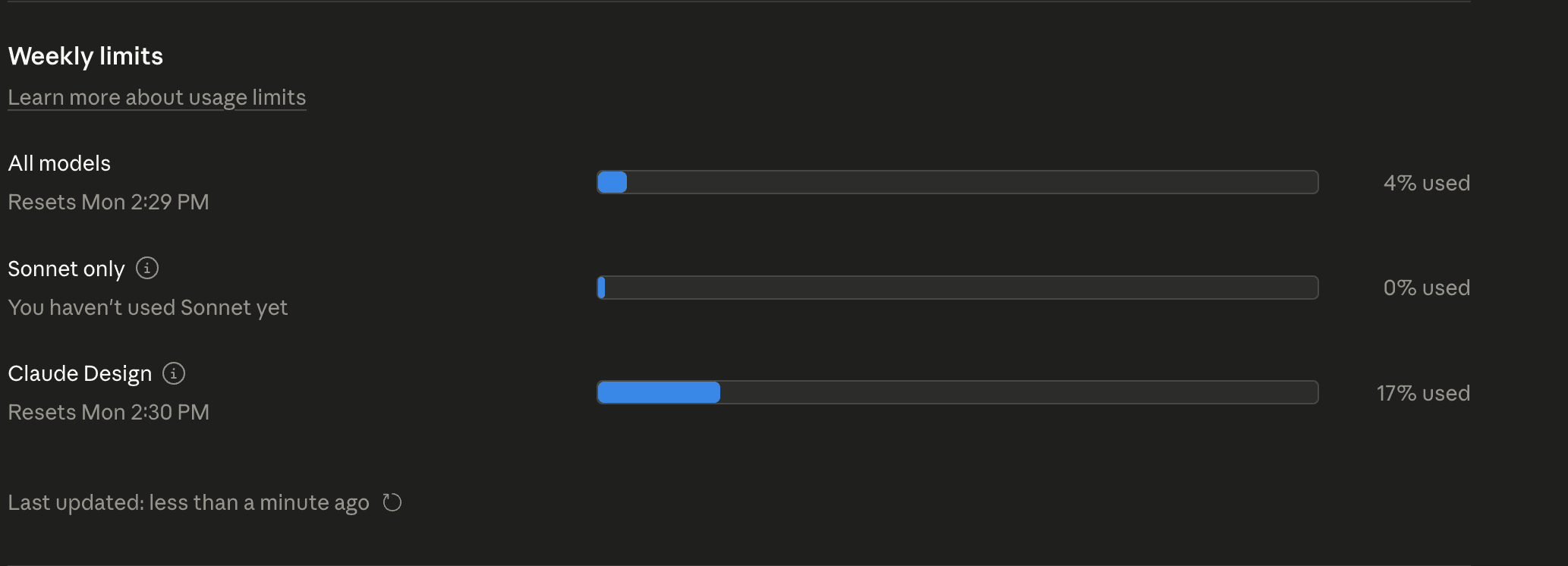
2. ~20% of a weekly limit per run
A single generation on a Pro-tier account consumes roughly a fifth of the week's allowance. Five generations, week's out. For solo exploration that is tolerable. For client work with revision rounds, it is a hard ceiling. Screenshot of the usage meter after a single design is below.
3. Model is locked
Claude Design runs on one Anthropic model. No GPT, no Gemini, no open-source. For jobs where a different model would be faster, cheaper, or better suited (Sonnet for the first eight drafts, Gemini Flash for fast exploration, Opus for the final), you have no lever to pull.
4. No collaboration or preview-link workflow
Claude Design sits inside Claude's chat interface. There is no native preview link to send to a client, no shared canvas for a team, no commenting layer. The review loop has to happen outside the tool, which defeats the speed advantage of generating inside it.
Same model, same prompt, ~4× difference
The most useful number in this comparison is the one where both tools run the same underlying Claude Opus 4.7. Same prompt, same model, different clock.
Same Anthropic model. Same one-paragraph prompt. Four times the speed. One-tenth the cost per run (roughly). Full walkthrough and verdict in the three-way comparison post.
dMaya vs Claude Design, side by side
| Claude Design | dMaya | |
|---|---|---|
| Time (same Opus model) | ~10 min | ~2.5 min |
| Cost per run | ~20% of weekly Claude limit | ~220 credits (Opus) / ~110 (Sonnet) |
| Pricing | Requires Claude Pro ($20+) or Max ($100+) | $18/mo Starter, $48 Pro, $120 Scale |
| Designs per month (real-world) | ~20 (Pro, limited by weekly wall) | ~136 (Starter, default model) |
| Model choice | One Anthropic model | Claude, GPT, Gemini, open-source |
| Iteration fit | One polished run, then wait for the week to reset | Economically viable at real volume |
| Design-system enforcement | Per-screen quality, no cross-screen system | Enforced across every screen |
| Collaboration | Inside a chat, no shared canvas | Shared canvas, preview links |
| Code export | In-chat render, no dedicated export path | Clean HTML for Cursor / Claude Code handoff |
| Roadmap transparency | Beta pricing "subject to change" | Published pricing, public roadmap |
Where Claude Design still wins
Two cases. If you are in either of them, do not switch on our account.
- You already pay for Claude Max and only need one polished screen a week. If your use case is "produce one hero screen for a blog post," Claude Design handles that cleanly and the cost is already sunk. No reason to switch.
- You want the output to live inside your Claude chat history. If your workflow is to generate a screen inside a conversation thread and keep it there for reference, Claude Design's integration with Claude chat is the right fit. dMaya is a separate surface.
Where dMaya wins
- Iteration at real volume. 136 designs a month on Starter versus ~20 a month on Claude Design Pro. If you iterate, this is the win.
- 4× faster on the same model. ~2.5 min vs ~10 min on Opus 4.7 in our test. Speed matters because design is iterative.
- Model choice per generation. Sonnet for exploration, Opus for final, Gemini for fast drafts, open-source for cost sensitivity. Claude Design has no lever.
- Design-system enforcement across screens. A multi-screen project actually looks like the same product in dMaya. Claude Design gives you per-screen quality without a cross-screen system.
- Preview links and team collaboration. Client opens a URL, sees the design, leaves comments. Whole review loop lives in one surface.
- Clean HTML export for agentic handoff. Cursor or Claude Code converts to React, Flutter, or your stack. Full workflow here.
- Transparent, published pricing. Three plans, one credit unit, no beta-period asterisks.
“It's like great idea meets great tool.”
What the session actually feels like
Claude Design lives inside Claude chat, which is genuinely good for a lot of things. For design work specifically, the chat-in-chat interface means your design back-and- forth competes with every other thread in the same conversation. Output lands in the thread, scrolls away as you iterate.
dMaya keeps the design conversation in its own surface. You plan with the agent, change direction mid-session, argue with its choices, and the design stays anchored on a canvas you can always see. The session feels like working with a skilled collaborator, not talking to a generator that happens to return pictures.
A preview built for sharing, not just rendering
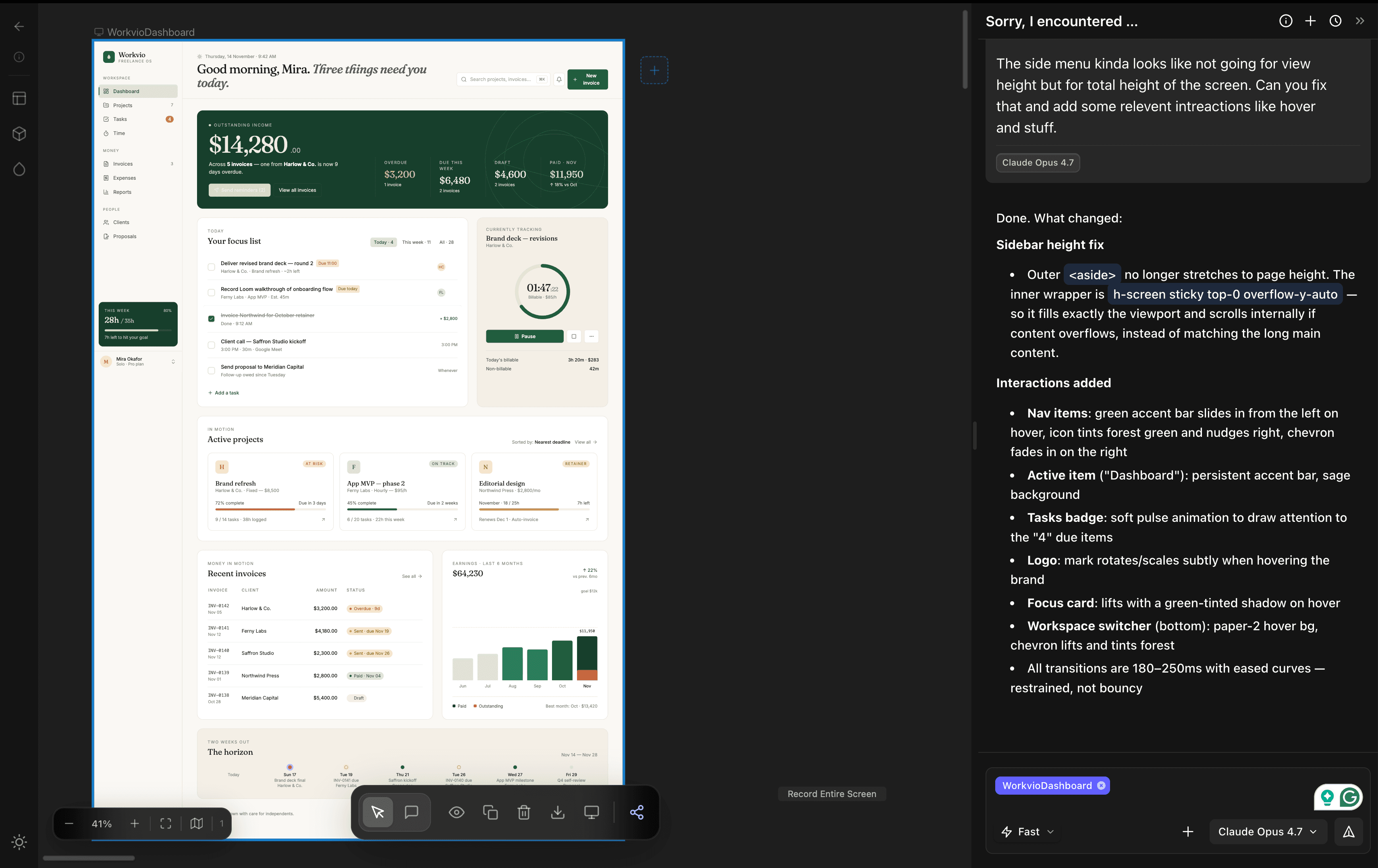
Claude Design renders inline in the chat. There is no dedicated preview surface designed for stakeholder review, no side menu for jumping between screens of the same project, no shareable link a client can open without a Claude account.
dMaya treats the preview as a first-class artifact. Shareable link. Side menu to navigate between screens. Anyone can open it in a browser, no login required. For client work, the review loop stops being an email thread and becomes a URL you refresh.
The philosophy: dMaya lifts the skill layer
Claude Design is a genuinely strong generator. It produces polished output when you can afford the ten-minute wait and the 20% weekly-limit hit. It is an excellent tool for someone already at Anthropic-scale usage who wants one or two hero screens a week.
dMaya's bet is different. A lot of people have ideas worth shipping and do not have formal design training. The tool lifts the skill layer. You still think, plan, research, decide. dMaya handles the craft: visual grammar, consistency across screens, design-system scaffolding. You stay the author. The tool is the skilled collaborator you did not have access to before. That makes dMaya a product for designers, non-designers, agencies, solo builders, and anyone in between who needs the tool to match the speed at which they can think.
Cost per design, in plain math
Subscription cost alone is a misleading comparison. Cost per usable design is the real number.
| Plan | Monthly price | Designs / month (estimated) | Cost per design |
|---|---|---|---|
| Claude Pro + Design | ~$20 | ~20 (weekly limit wall) | ~$1.00 |
| dMaya Starter | $18 | ~136 (default model) | ~$0.13 |
| dMaya Pro | $48 ($450/yr) | ~454 (default model) | ~$0.11 |
| dMaya Scale | $120 ($1,200/yr) | ~1,136 (default model) | ~$0.11 |
Same money, ~7× the throughput on the cheapest dMaya plan versus Claude Pro + Design, and you are not locked to one model. See the full dMaya pricing page.
Getting started on dMaya if you're coming from Claude Design
dMaya is prompt-first, so there is no file to import. The move is effectively "bring your prompt." Four steps:
- Sign up for the $18 Starter plan. 3,000 credits is ~136 designs on the default model, which is already more than Claude Design Pro's weekly-wall ceiling gives you in a month.
- Paste the prompt you were running in Claude Design. Pick a model. Opus 4.7 matches Claude Design directly; Sonnet 4.6 costs ~half the credits and is the better default for iteration.
- Iterate in chat. When you want higher fidelity for a client-facing screen, switch to Opus for that one run. Switch back to Sonnet to keep exploring.
- Share the preview link with your client. When approved, export HTML and hand it to Cursor or Claude Code. You are now shipping.
Frequently Asked Questions
Final verdict
Claude Design's output is genuinely good. It is also genuinely slow and genuinely expensive to iterate on. Those two constraints are where teams start looking for an alternative. If that is where you are, dMaya matches Claude Design on output quality, beats it 4× on speed with the same underlying Opus model, comes in at roughly a tenth of the cost per usable design, gives you model choice per generation, and exports clean HTML for handoff to your coding agent. Eighteen dollars, a week of real projects, and you will know.
Other tools that come up in this conversation
A few adjacent tools exist. None of them match what dMaya does, and we would not trade away from dMaya to pick any of them, but they have uses in specific cases.
- Google Stitch. Free, Google Labs, locked to Gemini. Fast, but the output has not been shippable for real client work in our same-prompt testing. Useful for sketching, not for shipping.
- Figma Make / Figma AI. AI features layered on top of the Figma canvas. In our testing, the output quality is meaningfully weaker than prompt-first tools, and you stay in the manual Figma workflow rather than moving past it. Only worth reaching for if leaving Figma is not an option for your team.
- Magic Patterns. Developer-ergonomic, React-flavored output. Decent for engineering-led work. Thinner on client review, multi-screen consistency, and the collaboration layer most teams need.
Try dMaya on your next project
Same Claude Opus you're used to. 4× faster. 10× the monthly capacity.
Start Designing