Google Stitch · 2026 Hands-On Review
Google's Vibe Design (Stitch 2.0): Tested Hands-On

Google Labs introduced "vibe design" with the Stitch 2.0 launch on March 18, 2026. The post was titled Introducing 'vibe design' with Stitch. The framing: instead of starting with a wireframe, you describe a business objective, a feeling you want users to have, or an inspiration. Stitch generates high-fidelity directions on a canvas. Voice input. Free during Labs. Six weeks later, every AI design tool in the category claims vibe design.
We tested Stitch the same week. Same prompt across Stitch (Flash and Pro), Claude Design (Opus 4.7), and dMaya (Opus 4.7). Same evaluator, same hour, same brief. This is the Stitch-specific write-up: what it does well, where it breaks, the real meaning of 350 generations a month, and which tool to reach for when Stitch is not enough.
We are dMaya, one of the tools in this category. The comparisons below are honest about Stitch, including the things it beats us on (speed, voice input, free during Labs).
Want Stitch's HTML in editable Figma layers? Free unlimited Stitch to Figma converter, no signup.
What Google means by "vibe design"
From the official Stitch 2.0 launch post: "Instead of starting with a wireframe, you can start by explaining the business objective you're hoping to achieve, what you want your users to feel, or even examples of what's inspiring you." That sentence is the closest thing the category has to a canonical definition.
Three things in that framing matter and are unique to Stitch's pitch. First, prompt-first instead of layout-first. Second, intent (objective, feeling, inspiration) instead of components. Third, exploration of multiple directions in parallel rather than committing to one wireframe and iterating it.
The category itself now includes Claude Design, dMaya, Figma Make, and Lovart. Google coined the term, but the practice exists across all of them. For the broader picture, see our vibe design field guide. This page is specifically about what Stitch does.
Stitch 2.0's six vibe design features
The March 2026 update added six things that are genuinely new to the product, separate from the broader Stitch interface that existed before.
1. Agentic systems
Multiple AI agents handle parallel tasks: typography optimization, color refinement, placeholder generation. The orchestration is what produces the "multiple directions in parallel" effect.
2. Voice Canvas (Gemini Live)
Hands-free design adjustments by voice. Most useful for cosmetic tweaks. Major structural changes still need text prompts because they require precision.
3. design.md format
A portable design specification format Stitch uses to bridge to development tools. Useful for teams piping output into custom workflows. Limited adoption outside Google's own ecosystem so far.
4. Design standard extraction
Automated analysis of existing assets (URLs, screenshots) for brand consistency. The quality of extraction varies. Works for surface-level color and typography. Misses deeper rules like spacing rhythm or motion language.
5. Native canvas
Real-time editing surface for the generated screens. Single-user. No multi-stakeholder collaboration in the canvas itself; sharing is an export, not a co-edit.
6. Export flexibility
Figma frames, HTML/CSS, and AI Studio integration. No clean React or framework export. HTML output is rough; ready for inspiration, not production.
Two of these (Voice Canvas and design.md) are genuinely innovative in the category. The other four are table stakes that other vibe design tools also offer.
Stitch's HTML output too rough to use directly? Paste it into our free Stitch to Figma converter to get editable Figma layers for free, with no monthly conversion quota.
Hands-on test: same prompt, real output
We ran Stitch on a freelancer SaaS dashboard prompt on April 24, 2026, alongside Claude Design and dMaya on the same brief. Below is the Stitch (Pro) run. Full three-tool test with all videos and timings lives at /blog/google-stitch-vs-claude-design-vs-dmaya.
| Metric | Stitch (Flash) | Stitch (Pro) |
|---|---|---|
| Time to first output | ~2 min | ~2 min (slightly slower queue) |
| Cost | Free (Labs) | Free (Labs) |
| Output positioning correct on first try | No | No |
| Multi-screen consistency | No (each generation independent) | No (same) |
| Output usable for client work | No (rough) | No (closer, still rough) |
Stitch produced output in two minutes on both Flash and Pro. The output had recurring positioning issues (especially with center-aligned elements), and screen-to-screen consistency was absent because each generation is independent. The output was useful as early exploration. It was not a deliverable.
Where Stitch wins
Three things Stitch genuinely does better than every alternative.
- Speed of first output. Two minutes from prompt to a visual you can react to. Faster than Claude Design (~10 min) and similar to dMaya (~2.5 min). For early ideation when you just need something on screen, this matters.
- Voice Canvas via Gemini Live. Genuinely novel. The voice loop for cosmetic adjustments works and feels different from typing. Best implementation of voice editing in the category right now.
- Free during Labs. No financial friction for testing. The 350/month cap is real, but for hobby work or evaluation, the price is right.
If your work is genuinely exploratory and the deliverable is "a visual to discuss" rather than "a design to ship", Stitch is the right call.
Where Stitch breaks (5 concrete limits)
1. Output positioning issues
The most consistent failure mode is alignment. Center-positioned elements drift. Hero headlines miss their grid. Asking Stitch to fix the positioning often produces a different layout entirely rather than a corrected version of the previous one. LogRocket's published Stitch tutorial flags the same issue independently.
2. Visual sameness across generations
Run the same kind of brief twice and the outputs share structure: similar hero patterns, similar button styles, similar typography pairings. Stitch converges on the output distribution Gemini was trained on. The advertised "multiple directions in parallel" produces variations within a narrow band, not genuinely distinct visual languages.
3. No design system or token integration
Stitch's design standard extraction handles surface-level brand consistency (color and typography) by analyzing URLs or assets. It does not load existing design tokens, component libraries, or motion rules. For agency teams with a real brand system, every Stitch generation invents a fresh visual identity that needs to be hand-mapped to the existing one.
4. Single-user only
No multi-stakeholder collaboration in the canvas. You can share an export, but you cannot co-edit, leave inline comments, or run a real review session inside the tool. For teams used to Figma's collaborative cursor model, this is a regression.
5. HTML/CSS export only (no clean framework conversion)
Stitch exports rough HTML and Figma frames. There is no first-class React, Vue, or framework export. To get from Stitch to production code, you hand the HTML to a coding agent (Claude Code, Cursor, Codex) and ask for the framework conversion. Possible, but it is a gap the user closes, not a path Stitch ships.
Need multi-screen consistency, design tokens, and a real export?
dMaya runs the design phase on a persistent multi-screen canvas with model picker (Opus, Sonnet, Gemini Flash) and clean HTML export to Claude Code. Plans start at $18/mo.
Start Designing350 generations a month: real workflow math
Stitch is free during Labs, with caps. The Standard tier allows 350 generations per month. Experimental allows 50. The headline number sounds large until you do the workflow math.
In our hands-on testing and in published Stitch tutorials, one usable design typically takes 3 to 5 generations of iteration: an initial pass, one or two adjustments for positioning and structure, often a re-roll for a different aesthetic direction. Three screens with that depth eat 9 to 15 generations.
At that rate, 350 generations is roughly 70 to 100 finished designs per month. For a solo builder, that is plenty. For an agency running multiple client projects in parallel, it is tight. For anyone doing real iteration on a complex product, it can disappear in a single sprint.
The cap also lacks rollover. Light months do not bank generations for heavy months. Once you hit zero, you wait for the calendar.
What to use when Stitch is not enough
Three alternatives matter, depending on what Stitch is failing to do for you.
| If Stitch fails on | Reach for | Why |
|---|---|---|
| Single-screen polish | Claude Design (Opus 4.7) | Highest quality on a single screen. Burns ~20% of weekly Claude Pro per run, so use sparingly. See the Claude Design alternative page for the full comparison. |
| Multi-screen consistency, brand integration, real export | dMaya | Persistent multi-screen canvas, model picker per generation (Opus, Sonnet, Gemini Flash), clean HTML export to Claude Code. $18/month Starter. The full same-prompt test is at /blog/google-stitch-vs-claude-design-vs-dmaya. |
| Existing Figma team, design system inheritance | Figma Make | Stays inside Figma, inherits your tokens and components automatically. Worse for handoff outside the Figma surface. |
Lovart and Visily are also in the broader vibe design conversation, but they target marketing and wireframes respectively, not product UI. See the vibe design field guide for the full landscape.
When Stitch is the right call
Use Stitch when
- ✓ You are exploring, not delivering
- ✓ The output is for personal review or early ideation
- ✓ Voice input is valuable to your workflow
- ✓ You are cost-sensitive and the 350/mo cap suits your volume
- ✓ You can absorb positioning issues and visual sameness
Skip Stitch when
- ✗ You need to ship to a client
- ✗ The product has multiple screens that must feel like one product
- ✗ Brand consistency or design tokens are non-negotiable
- ✗ The team has to collaborate inside the tool, not just on exports
- ✗ The output goes to production code cleanly (use a tool with proper framework export)
Stitch is a real product doing real work in the category Google named. It is also deliberately positioned at exploration, not delivery, and the workflow gap between Stitch output and shippable product UI is wider than the marketing implies. For solo work and ideation, it is the right call. For everything else, you are reaching for a different tool.
We built dMaya because the workflow Stitch points at, prompt-first design with a real canvas, deserves to ship product UI on a budget that does not break at scale. If that is the work you are doing, the link below is the one we want you to follow.
Run vibe design that ships product UI.
dMaya gives you Opus, Sonnet, and Gemini Flash on a multi-screen canvas with HTML export to Claude Code. Plans start at $18/mo.
Start DesigningKeep reading
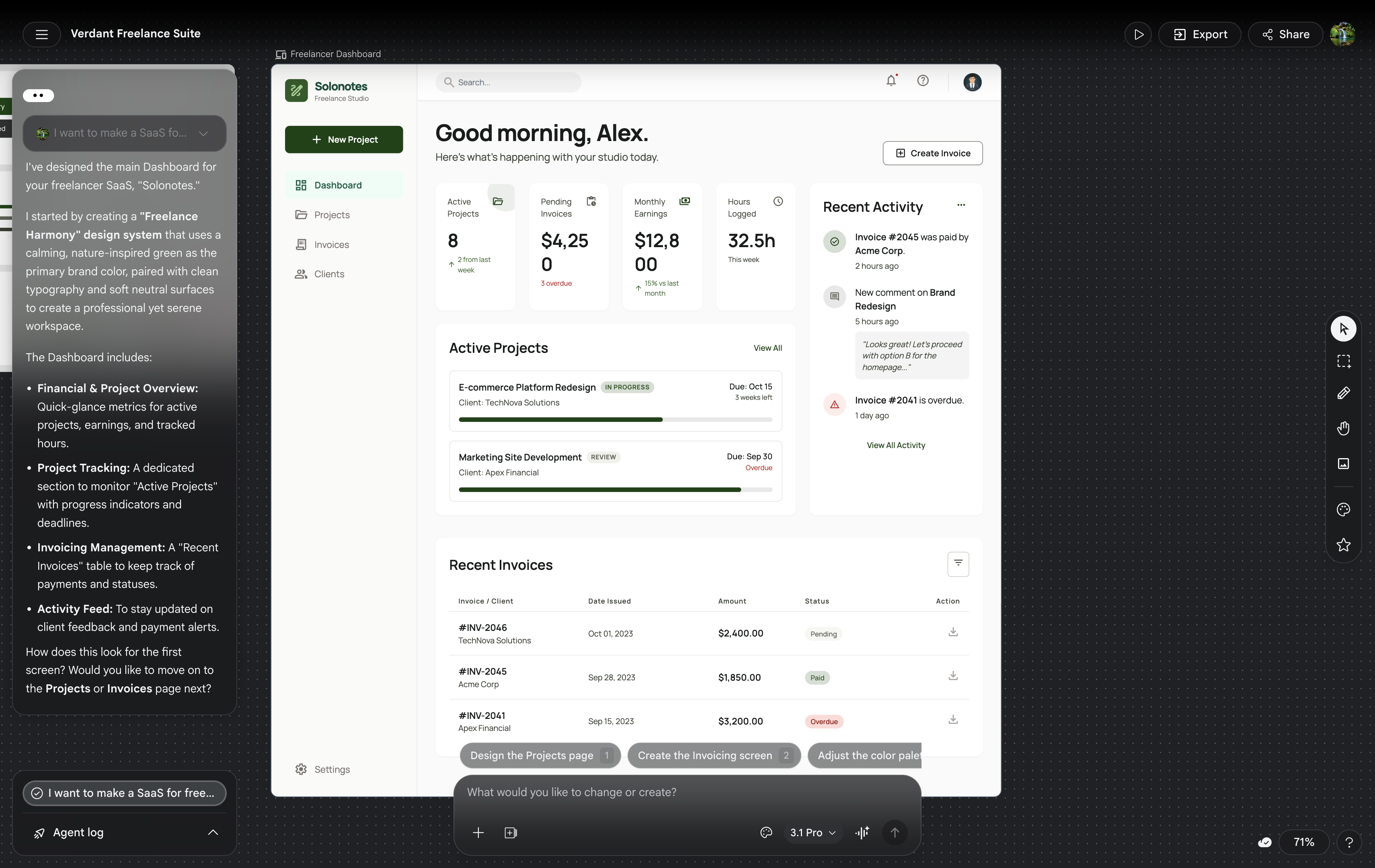
The full test
Google Stitch vs Claude Design vs dMaya
Same prompt, three tools, real timings on video.
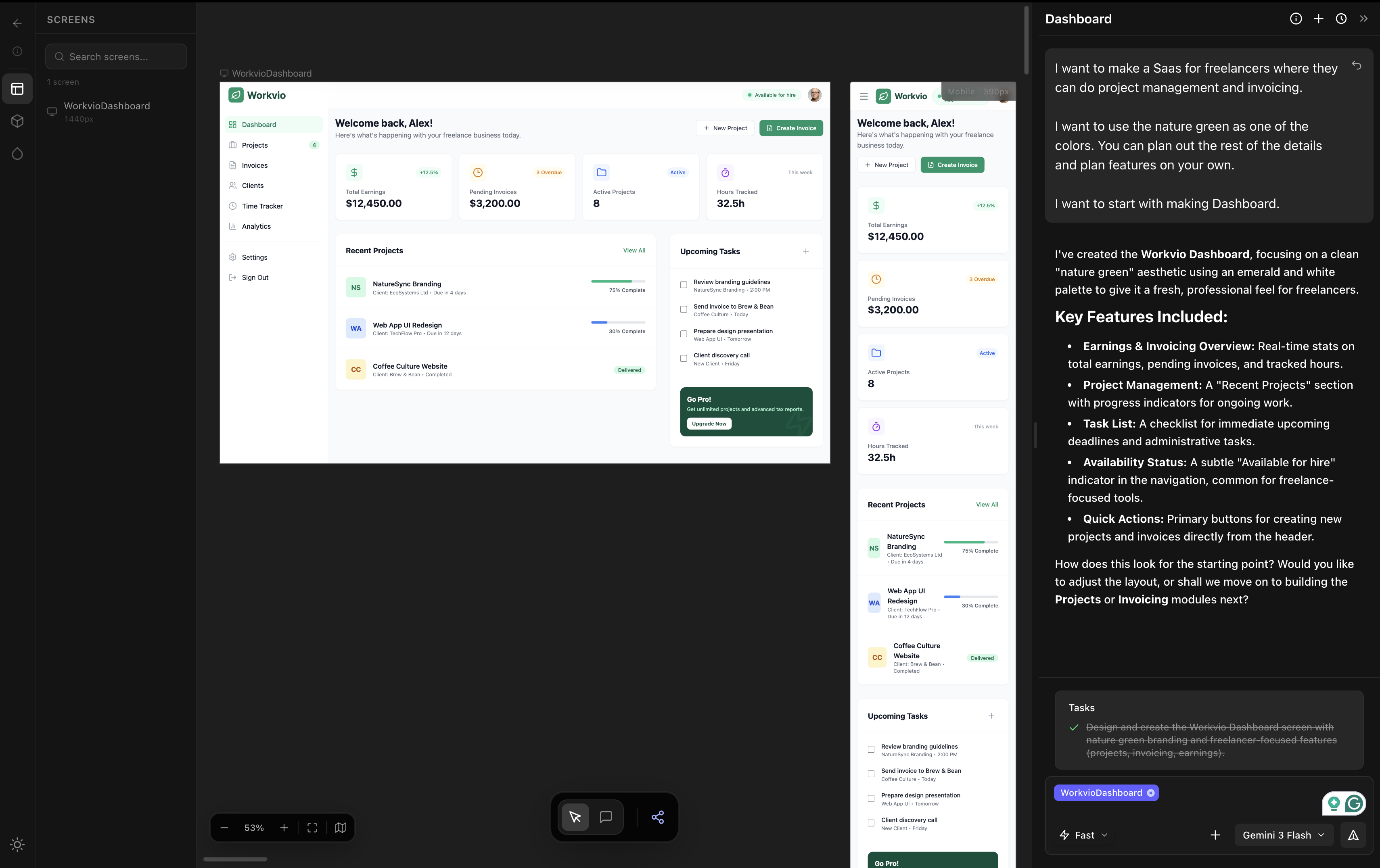
The category
Vibe Design: The Definitive 2026 Guide
Definition. 5 tools compared. Real timings. The workflow that ships.
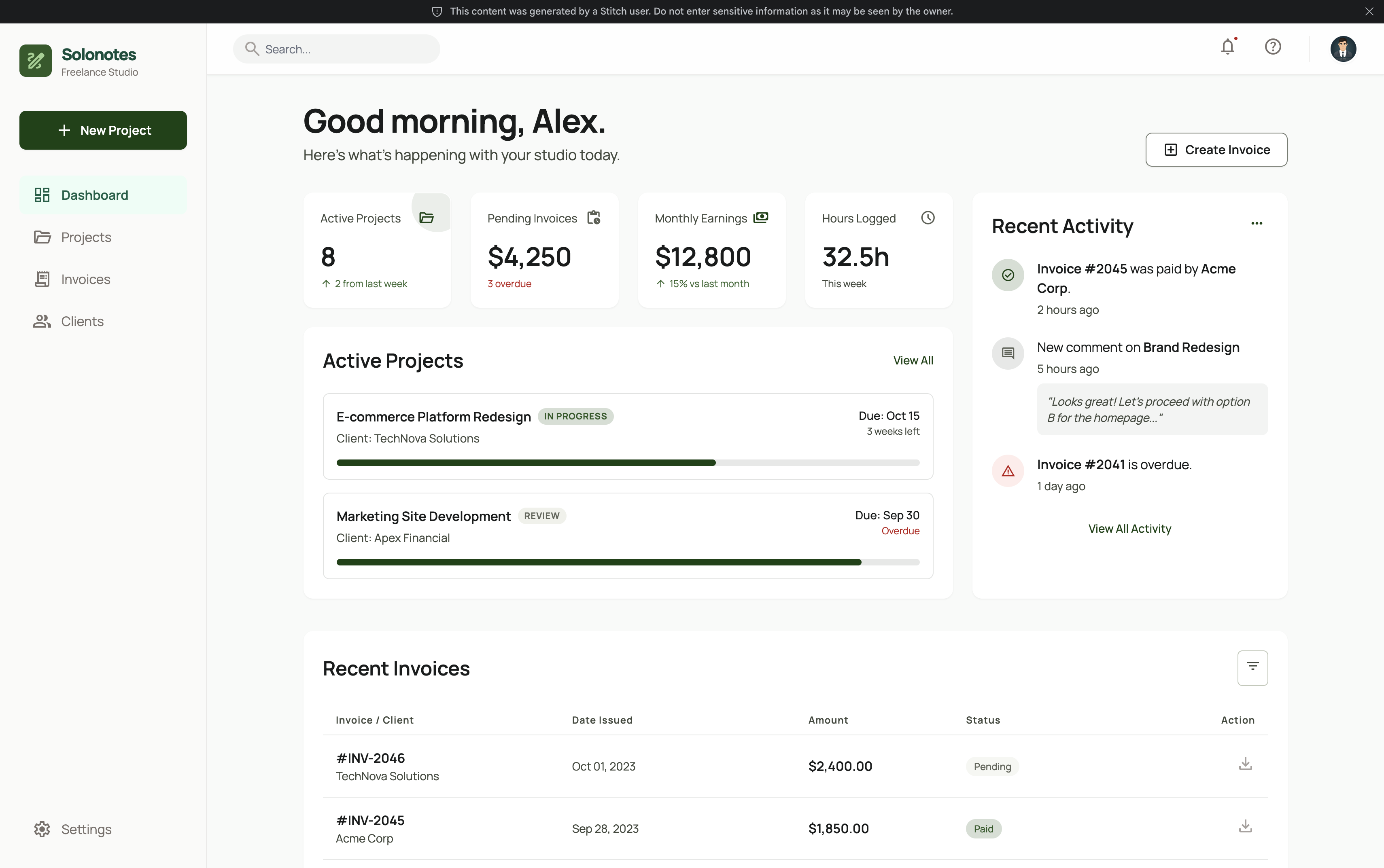
Alternative
The Best Google Stitch Alternative in 2026
If Stitch breaks on multi-screen or export, here is what to use.