Comparison · Tested April 2026
Looking for a Google Stitch alternative? Here's the short answer.

Google Stitch works for sketching. It does not work for shipping. That is the honest version of the conversation happening across every agency, product team, and founder who has tried to take a Stitch-generated screen into a real client review. This page is the long version of that conversation, with real test data, pricing math, and a direct recommendation.
If you are ready for the short answer, it is dMaya. If you want the full picture of why, and the cases where Stitch still has a role, read on.
What Google Stitch is, briefly
Google Stitch is a free experimental AI UI design tool from Google Labs, launched at Google I/O 2025 and overhauled in March 2026 in the release that sent Figma's stock down 8% in a day. It generates UI from prompts, screenshots, or sketches, runs on Gemini (Flash or Pro), and exports to Figma or HTML/CSS.
It is real, it is fast, and it is free. It is also a Labs product. That means no production SLA, no enterprise controls, and genuine uncertainty about long-term availability. For exploration, all three of those are fine. For anything with a client or a deadline attached, they matter.
Why people are leaving Google Stitch
Four reasons show up repeatedly. None are "the tool is bad." They are "the tool does not fit the job once the job gets real."
1. Output is decorative, not shippable
The first screen looks fine as a demo. It does not hold up to a client review. On our same-prompt test, the Stitch output had none of the production details a real dashboard needs: no meaningful empty states, no coherent component hierarchy, spacing that reads like a mood board rather than an interface.
2. No design-system enforcement
Generate three screens in a row and watch the visual language drift. Button styles change, color relationships shift, type scales inconsistently. There is no shared design-system substrate holding things together. On a 20-screen project, that is disqualifying.
3. Model choice is locked to Gemini
Gemini Flash and Pro are both respectable. They are also the only options. Different jobs want different models (Claude for polish, GPT for certain reasoning patterns, Gemini for fast iteration, open-source for cost sensitivity). Stitch does not let you pick.
4. No real collaboration or client preview
You cannot hand a Stitch session to a client, keep comments in one place, or iterate with a teammate in real time. The tool is single-player. Client-facing work needs a preview-link workflow that Stitch does not ship.
dMaya in 60 seconds
dMaya is the prompt-first vibe design platform built for anyone shipping real design work, whether that's an agency, a product team, a freelancer, or a first-time builder with a strong idea. Describe what you need, pick a model, a canvas fills in with a real design tied to a design system that stays consistent across every screen. Share a preview link with your client, iterate in chat, export clean HTML when approved.
The same prompt, every way you can stack it
Three rounds. First an equal-tier match. Then we give Stitch its best model and dMaya one of its cheapest. Then we show what dMaya looks like when you actually reach for the better tiers. Every video is the same prompt on the same day.
Round 1. Equal tier: Stitch Flash vs dMaya Flash
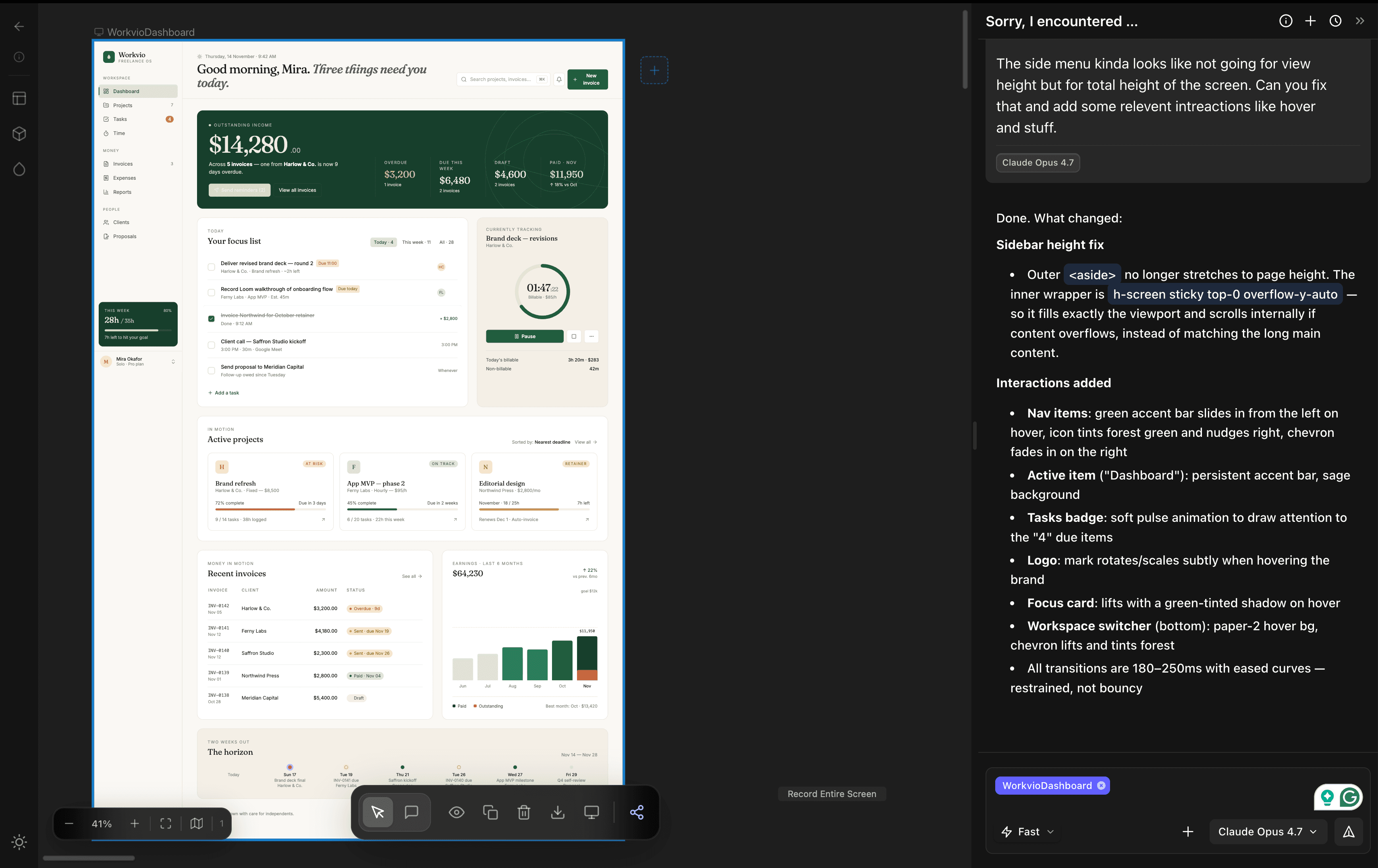
Same underlying model, same clock. dMaya's output honors the nature-green constraint, spaces components intentionally, and reads like a real dashboard. Stitch's reads like a mood-board of a dashboard.
Round 2. Handicap reversed: Stitch's best vs dMaya's cheapest
Give Stitch their strongest model, stay on our cheapest. dMaya still lands closer to shippable. If this is the handicap, the ceiling conversation gets interesting.
Round 3. What dMaya can actually do: Sonnet and Opus
When you reach for higher model tiers in dMaya, the output is not on the same chart as Stitch anymore. Sonnet is the pragmatic default for iteration. Opus is the top tier when the fidelity has to be highest.
Click any video to expand. The progression is the whole point: dMaya ties or beats Stitch on equal footing, wins even with the handicap reversed, and keeps going into territory Stitch cannot reach because it cannot run these models.
dMaya vs Google Stitch, side by side
| Google Stitch | dMaya | |
|---|---|---|
| Output quality | Decorative, not shippable | Shippable after one follow-up |
| Time per generation | ~2 min | ~2.5 min (Opus), faster on Sonnet/Flash |
| Pricing | Free (Labs) | $18/mo Starter, $48 Pro, $120 Scale |
| Cost per design | $0 + cleanup time | ~$0.13 on Starter (default model) |
| Model choice | Gemini Flash or Pro | Claude, GPT, Gemini, open-source |
| Design-system consistency | Drifts across screens | Enforced by the tool |
| Collaboration | Single-player | Team-native, shared canvas |
| Client preview links | None | One-click, no login required |
| Code export | HTML/CSS, Figma | Clean HTML for Cursor / Claude Code handoff |
| Production SLA | None (Labs) | Commercial product |
The same-prompt test, in numbers
On April 24, 2026, we ran this prompt through Stitch, Claude Design, and dMaya back to back:
“I want to make a SaaS for freelancers where they can do project management and invoicing. I want to use the nature green as one of the colors. You can plan out the rest of the details and plan features on your own. I want to start with making Dashboard.”
- Google Stitch: about 2 minutes, free, output not shippable for client work.
- dMaya on Opus 4.7: about 2.5 minutes, ~220 credits, shippable after one follow-up to fix a side-menu layout detail.
- dMaya on Sonnet 4.6: faster than Opus, ~110 credits, comparable output quality for this dashboard.
Full videos, stat strips, and the honest verdict are in the full same-prompt comparison post.
Where Google Stitch still wins
Three cases. If you are in any of them, dMaya is not the right reach.
- Zero-cost sketching. If you need to try ten ideas in an afternoon and throw nine of them away, Stitch costs nothing. dMaya's Starter is $18 and that is real money.
- Personal exploration with no deliverable. You are curious what a dashboard could look like. You are not shipping. Stitch is fine.
- Stitch-to-Figma handoff if your team lives in Figma. Stitch exports to Figma in a way that fits existing Figma pipelines. If you are not going to leave Figma, that is useful.
Where dMaya wins
- Client-ready output from the first run. Our test put a usable freelancer SaaS dashboard on the canvas in one generation, with one small layout fix on a second prompt. Stitch did not.
- Design-system consistency across screens. dMaya holds tokens and components across every generation after the first. Your 20-screen project actually looks like the same product.
- Model choice per run. Sonnet for the first eight iterations, Opus for the final, Gemini for fast exploration, open-source rolling out. Pick per job.
- Preview links and team collaboration. A client opens a URL, sees the current design, leaves comments. The whole review loop lives inside the tool.
- Clean HTML export for agentic handoff. Cursor or Claude Code converts to React, Flutter, React Native, or your stack, in code that fits your conventions. Full workflow here.
- Commercial product, not Labs. dMaya is a commercial product with a pricing page and a roadmap. Stitch is a Labs experiment whose future is at Google's discretion.
“It's like great idea meets great tool.”
What the session actually feels like
Stitch feels like a machine. Input goes in, output comes out. No dialogue, no back-and-forth, no sense that the tool is thinking with you. You are not planning a design, you are operating a generator.
dMaya is a conversation. You describe the idea. The agent asks what you want to see. You iterate together. You can plan the information architecture out loud, change direction mid-session, argue with a choice it made. The experience is closer to working with a quick designer than to filling in a form. For anyone who has an idea but is not a trained designer, this is the difference between "the tool made something" and "I made something with the tool."
A preview built for sharing, not just rendering
When Stitch finishes a generation, the output renders inside the tool's interface. No separate preview surface for showing to a client, no side menu to navigate between screens of the same project, no shareable link where a stakeholder can see exactly what you see without logging in.
dMaya treats the preview as a first-class artifact. A dedicated shareable link. A side menu that lets anyone (you or a client) jump between screens in a multi-screen project. Works in any browser, no account required. The review loop that usually lives in Figma, email threads, or Loom videos collapses into a URL.
When your idea is not a template
Stitch ships with a set of design guidance patterns. If your idea fits one of them (a clean mobile onboarding flow, a generic SaaS landing page), the output is reasonable. The moment you bring something of your own (a specific color system, an unusual layout, a domain nobody has templated yet), the quality drops sharply.
Our test prompt is a good example. We asked for a freelancer SaaS dashboard with nature green as one of the colors. A specific constraint, a specific domain, not somebody's template. Stitch's output did not reflect the constraint well even on Gemini 3.1 Pro. dMaya's did on Flash, because dMaya is not trying to match your prompt to a pattern; it is trying to build what you asked for.
This is the gap you feel on the second or third custom project, once the novelty wears off.
The philosophy: dMaya lifts the skill layer
The deeper difference is about what the tool is for. Stitch is a generator, in the literal sense: a thing that turns a prompt into a picture.
dMaya's bet is that a lot of people have ideas worth shipping and do not have the formal design training to execute them cleanly. The tool lifts the skill layer. You still think, plan, research, argue with yourself about the right direction, and decide. dMaya handles the craft side: visual grammar, consistency across screens, design-system scaffolding. You stay the author. The tool is the skilled collaborator you did not have access to before.
That framing flips what the comparison is really about. Stitch asks "can the AI make a design?" dMaya asks "can a person with an idea make the design they actually wanted?" Those are different products.
Pricing in plain math
Free-vs-paid is not the real comparison. Cost per usable design is.
| Tool | Price | Designs / month | Usable for client work? |
|---|---|---|---|
| Google Stitch | $0 | Unlimited (Labs-tier, no SLA) | Not in our test |
| dMaya Starter | $18/mo | ~136 (default model) | Yes |
| dMaya Pro | $48/mo or $450/yr | ~454 (default model) | Yes |
| dMaya Scale | $120/mo or $1,200/yr | ~1,136 (default model) | Yes |
See the full dMaya pricing page. All plans include every feature. No gates, no paywalls, no seat taxes on collaborators.
Getting started on dMaya if you're coming from Stitch
dMaya is prompt-first, so there is no file to import. The migration is effectively "bring your prompt." Four steps:
- Sign up for the $18 Starter plan. 3,000 credits is roughly 136 designs on the default model; plenty to get a real feel.
- Open a new project. Paste the prompt you were running in Stitch. Pick a model (the default is a good starting point; switch to Claude Opus when the fidelity has to be highest).
- Watch the canvas fill in. Iterate in chat: "tighten the sidebar," "use a warmer palette," "add a mobile variant." Each change is a prompt, not a toolbar tour.
- Share the preview link with your client or team. When approved, export HTML and hand it to Cursor or Claude Code to convert into whatever framework you ship in.
First usable design usually lands inside the first fifteen minutes of a new account.
Frequently Asked Questions
Final verdict
If Stitch is working for you, keep using it. It is a genuinely useful tool for exploration and for teams already committed to Figma. But if you are asking the question in the title of this page, you have probably already noticed where Stitch stops being the right tool. dMaya is where the workflow picks up: prompt in, shippable design out, consistent across screens, exportable to clean HTML, with a model picker that fits the job. $18 a month, a week of real projects, and you will have your answer.
Other tools that come up in this conversation
A few adjacent tools exist. None of them match what dMaya does, and we would not trade away from dMaya to pick any of them, but they have uses in specific cases.
- Banani. Multi-screen mobile flow focus. Useful if your work is ten-screen app flows more than polished single-page designs.
- Framer. Goes from prompt straight to a deployed marketing site. Useful when the deliverable is a live URL today, not a design handoff to a developer.
- Figma Make / Figma AI. AI features layered on top of the Figma canvas. In our testing the output quality is meaningfully weaker than prompt-first tools; you also stay in the manual Figma workflow rather than moving past it. Only worth reaching for if leaving Figma is not an option for your team.
- Magic Patterns. Developer-ergonomic, React-flavored output. Decent for engineering-led work. Thinner on client review, multi-screen consistency, and the collaboration layer most teams need.
Try dMaya on your next project
Describe what you want. Pick a model. Ship something your client signs off on.
Start Designing