Bolt.new · 2026 Hands-On Review
Bolt.new Review (2026): Hands-On Test of the Highest-Quality Vibe Coding Output

We ran the same brief through six AI tools. Bolt produced the best output of the coding-first ones (Bolt, Lovable, v0). Output sat close to what dMaya generated with Claude Sonnet, which is the highest-quality non-Bolt output we have seen from any AI tool in this category. The honest verdict: Bolt is genuinely good.
We are dMaya, one of the tools Bolt competes with on the design phase. The video below is real, generated from the same prompt every other tool got. We are not neutral, but Bolt earned the #2 ranking in our 6-tool test on real output, not on marketing.
This is the full review: hands-on output, exact pricing, side-by-side dMaya comparison, where Bolt wins, where it falls short, and what to use when it is not the right fit.
For comparison, the same prompt run through dMaya with Claude Opus 4.7 (multi-screen output: dashboard, time tracking, all projects):
Want Bolt's running app in Figma? Free unlimited Bolt to Figma converter, no signup.
What Bolt.new actually is
Bolt is a vibe coding tool: prompt to running app. Type a description, get back a deployed web application with frontend, backend, database, and authentication scaffolded. Iteration happens via chat with the AI or by editing the running code. Output is a real application, not a static mockup.
It sits in the same category as Lovable, v0, and Replit. Among the coding-first tools, Bolt's positioning is output quality: the running app should look like something a real designer made, not the generic AI-templated default. In our test, that positioning held up.
It is not a vibe design tool. It does not produce a static mockup, run a multi-screen canvas, or hand off to coding agents like Cursor or Claude Code. The output is the deployed app itself.
The hands-on test
Same brief we ran across all six tools in our full prototype tool comparison:
I want to make a SaaS for freelancers where they can do project management and invoicing.

I want to use the nature green as one of the colors. You can plan out the rest of the details and plan features on your own.

I want to start with making Dashboard.
Bolt produced the dashboard in about 3 minutes. Output had committed typography, real spacing rhythm, and color choices that respected the nature-green ask without going overboard. The output looked closer to what a real designer would build than what most AI tools produce on a first prompt.
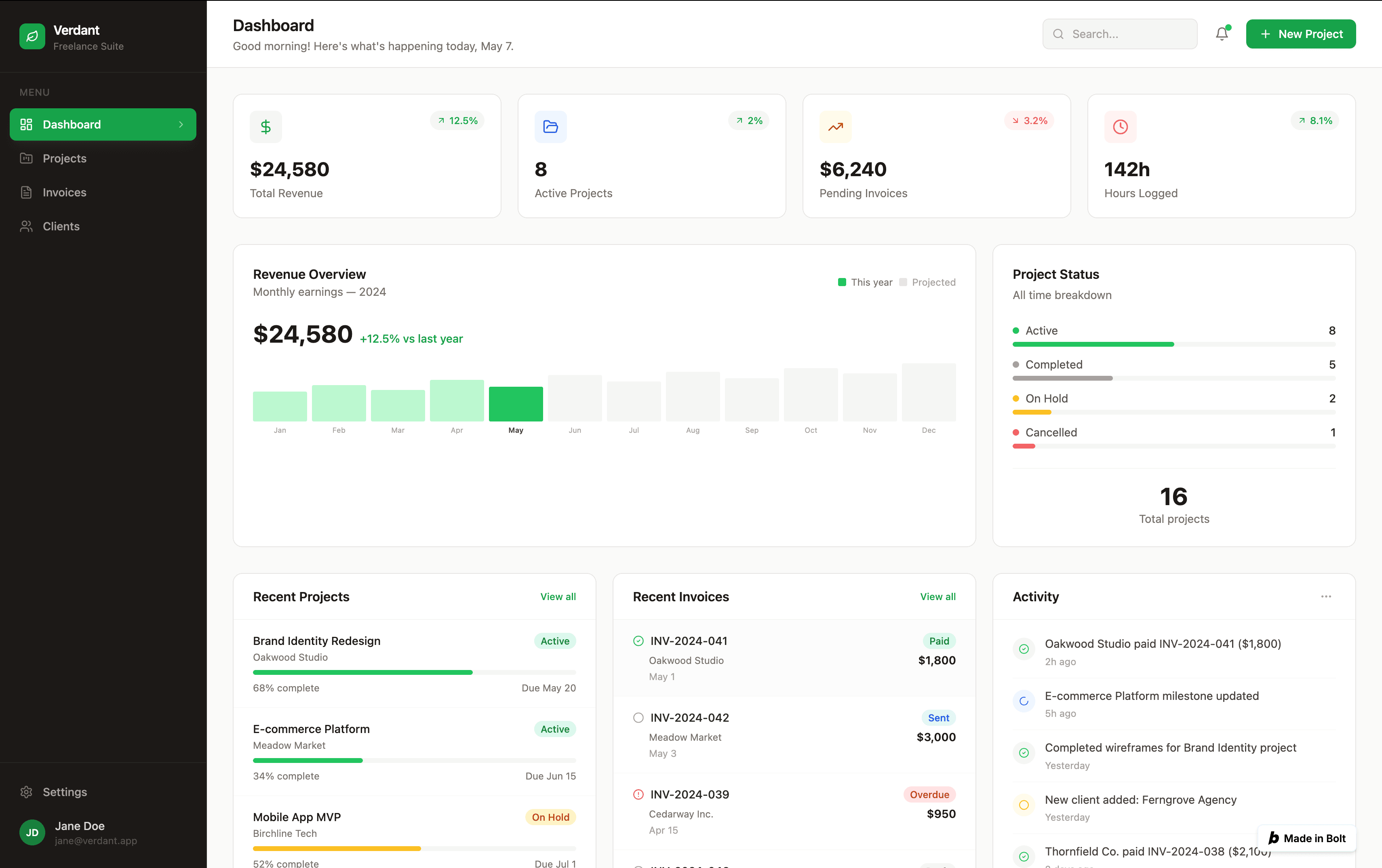
Comparing across the six tools we tested: Bolt was the strongest of the coding-first tools (Lovable, v0, Bolt), and the gap between Bolt and dMaya with Claude Sonnet was small enough that on a different brief or run, Bolt could plausibly come out ahead. dMaya with Claude Opus was clearly above on multi-screen consistency, but on the dashboard alone, Bolt is genuinely competitive.
For multi-screen testing, Pro at $25/month is the realistic floor. The free tier covers a single dashboard for exploration, which is consistent with how paid AI tools in this category price free tiers. The cost is normal for the category, not a knock against Bolt specifically.
Where Bolt wins
- Output quality. Best of the coding-first tools in our test. Close to dMaya with Claude Sonnet. For users who care about visual polish on the running prototype, Bolt is the right pick among coding-first tools.
- Full running app. Real deployed application from a single prompt. Frontend, backend, database, authentication scaffolded. Deploy in one click. For solo MVP work where the deliverable is a live URL, Bolt earns its keep.
- Token rollover on Pro. 10M tokens monthly with rollover means heavy months balance lighter ones. More designer-friendly than tools where credits expire.
- No daily cap on Pro. Unlike free tier (300K tokens daily), Pro has no daily throttle. Heavy iteration days are not punished.
- Active community. Hackathons, integrations, and Bolt-specific tutorials are widely available. Lower friction for finding answers when stuck.
Where Bolt falls short
1. Pro tier needed for multi-screen evaluation
Bolt's free tier covers single-screen exploration; multi-screen work needs Pro at $25/month. This is normal for paid AI tools in the category (Lovable Pro is also $25/mo, dMaya Starter is $18/mo, Cursor Pro is $20/mo). Plan the $25/month into your evaluation budget. Bolt's pricing model is fair; we mention the credit math because it shapes evaluation, not because it is unique to Bolt.
2. No design phase before code
Bolt jumps straight to running app from a prompt. There is no design canvas where you settle the visual direction before code, no preview link for non-technical stakeholders to review, no brand-token integration before generation. For solo work this is fine. For client work or team work where a designer or stakeholder has to approve the look before development, Bolt skips the phase that decision should happen in.
Workaround when you need Figma: paste your Bolt preview URL into our free Bolt to Figma converter to get editable Figma layers from the running app.
3. Single model, no picker
Bolt uses one model under the hood (the model is not user-selectable). You cannot switch between Opus for hero direction, Sonnet for fast iteration, and Gemini Flash for cheap exploration the way dMaya allows. The single-model lock means you pay the same rate regardless of the work, which leaves either money or quality on the table compared to tools with explicit model pickers.
4. Multi-screen consistency is the user's job
Each generation is technically independent. Generating a dashboard, then a settings screen, then a billing screen produces three outputs that look related (Bolt is consistent on a session level) but require manual review to ensure components and spacing actually match. For real product UI with five or ten screens, the cumulative drift adds up.
Pricing reality
| Tier | Price | Tokens | Notes |
|---|---|---|---|
| Free | $0 | 300K daily, 1M monthly | Exhausts on a single dashboard in our test |
| Pro | $25/month | 10M monthly, no daily cap, rollover | Realistic floor for serious work |
| Teams | $30/member/month | Same as Pro + team features | Collaboration tools, shared resources |
| Enterprise | Custom | Negotiated | Advanced security, compliance, 24/7 support |
For comparison: Lovable Pro is also $25/mo with credit-based pricing. v0 has free tier with more generous limits than Bolt's in our test. dMaya Starter is $18/mo and covers the design phase before any of these tools touches code. Most users running serious work end up paying $25/mo for one of these coding-first tools regardless of which they pick.
Lock the multi-screen design before Bolt burns your tokens.
dMaya runs the design phase end-to-end on a multi-screen canvas with model picker (Opus, Sonnet, Gemini Flash), then exports clean HTML to Bolt or any coding agent. Plans start at $18/mo.
Start DesigningWhat to use instead
Three honest alternatives, depending on what Bolt is failing for you.
| If Bolt fails on | Reach for | Why |
|---|---|---|
| Chat-driven iteration | Lovable | Smoother chat loop than Bolt. Output is a step behind on quality, but the iteration model is friendlier for non-developers. See our Lovable review. |
| Speed and Vercel stack | v0 | Fastest of the three (under 2 min in our test). Lowest friction for Next.js + shadcn workflows. More generous free tier in our test. |
| Multi-screen design before code | dMaya | Vibe design tool with model picker (Opus, Sonnet, Gemini Flash), persistent multi-screen canvas, brand-aware, clean HTML export ready to hand to Bolt or any coding agent. $18/mo Starter. |
Full same-prompt comparison with all six tools tested side by side, with videos: The Best AI Prototype Tool in 2026.
When Bolt is the right call
Use Bolt when
- ✓ Visual polish on the running app matters most
- ✓ You want a deployed full-stack app, not a static mockup
- ✓ Solo MVP work where the deliverable is a live URL
- ✓ You will pay for Pro at $25/mo for real evaluation
- ✓ Token rollover suits your bursty work patterns
Skip Bolt when
- ✗ Multi-screen consistency is non-negotiable
- ✗ Brand integration must drive the generation
- ✗ Stakeholders need to review the visual before code
- ✗ You want to pick the model per generation
- ✗ Free tier evaluation is the bar (it will not stretch)
The fairest read on Bolt in 2026: it is the strongest coding-first tool for output quality. Among Lovable, Bolt, v0, Bolt is the one we would pick for a designer-led engineering team that wants the running app to look intentional from generation one.
For the cases where Bolt's no-design-phase model is a constraint rather than a feature, dMaya as the design phase before Bolt is the workflow that ships product UI without burning tokens on visual decisions that should have happened on a canvas. For the broader picture, see the full 6-tool comparison or the coding-first three-way comparison.
Run the design phase first. Hand the locked design to Bolt for the build.
dMaya gives you Opus, Sonnet, and Gemini Flash on a multi-screen canvas with HTML export ready for Bolt, Lovable, or Cursor. Plans start at $18/mo.
Start DesigningKeep reading
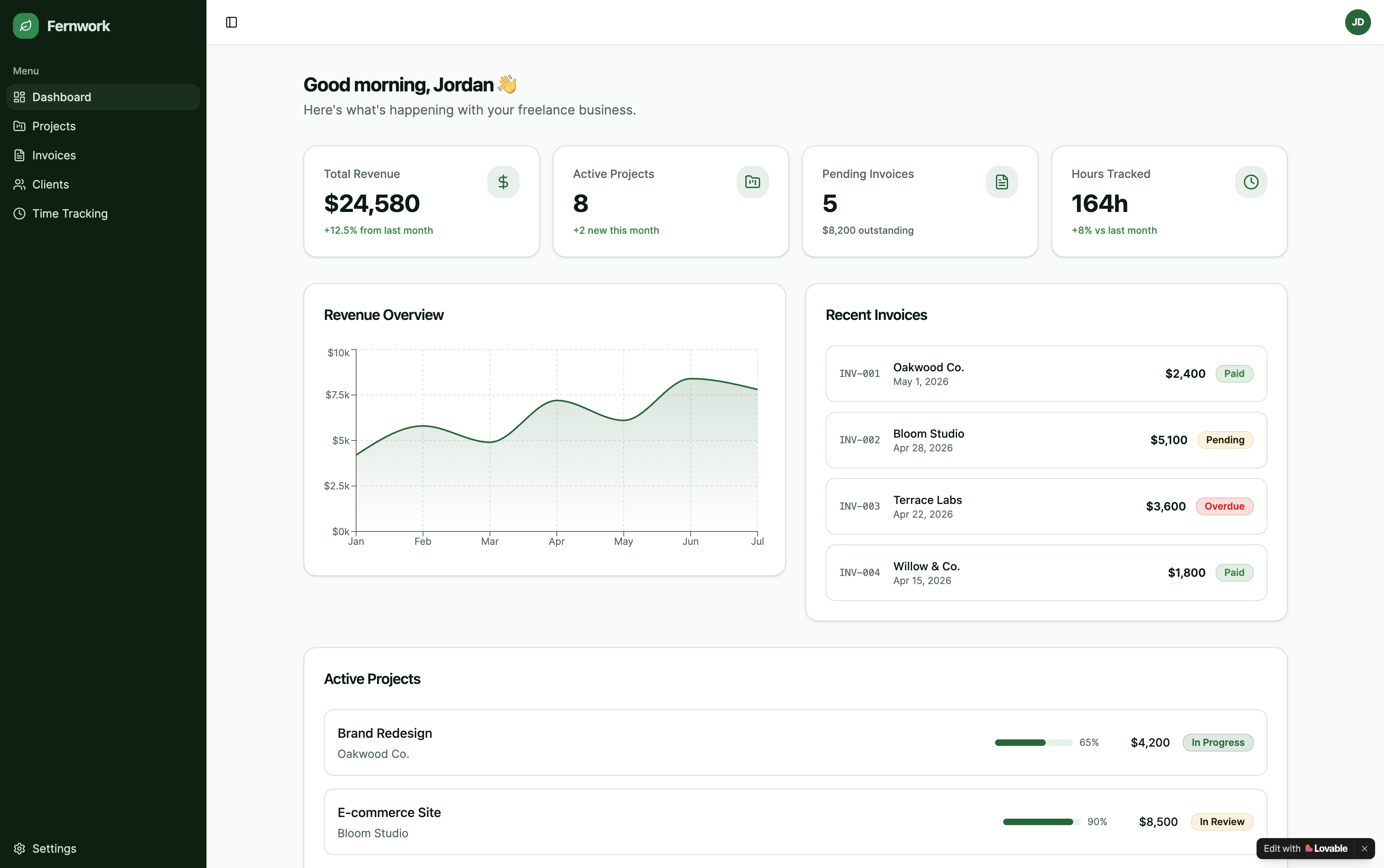
Hands-on review
Lovable Review (2026)
Smoothest chat iteration. Average output. Pro tier $25/mo for multi-screen.
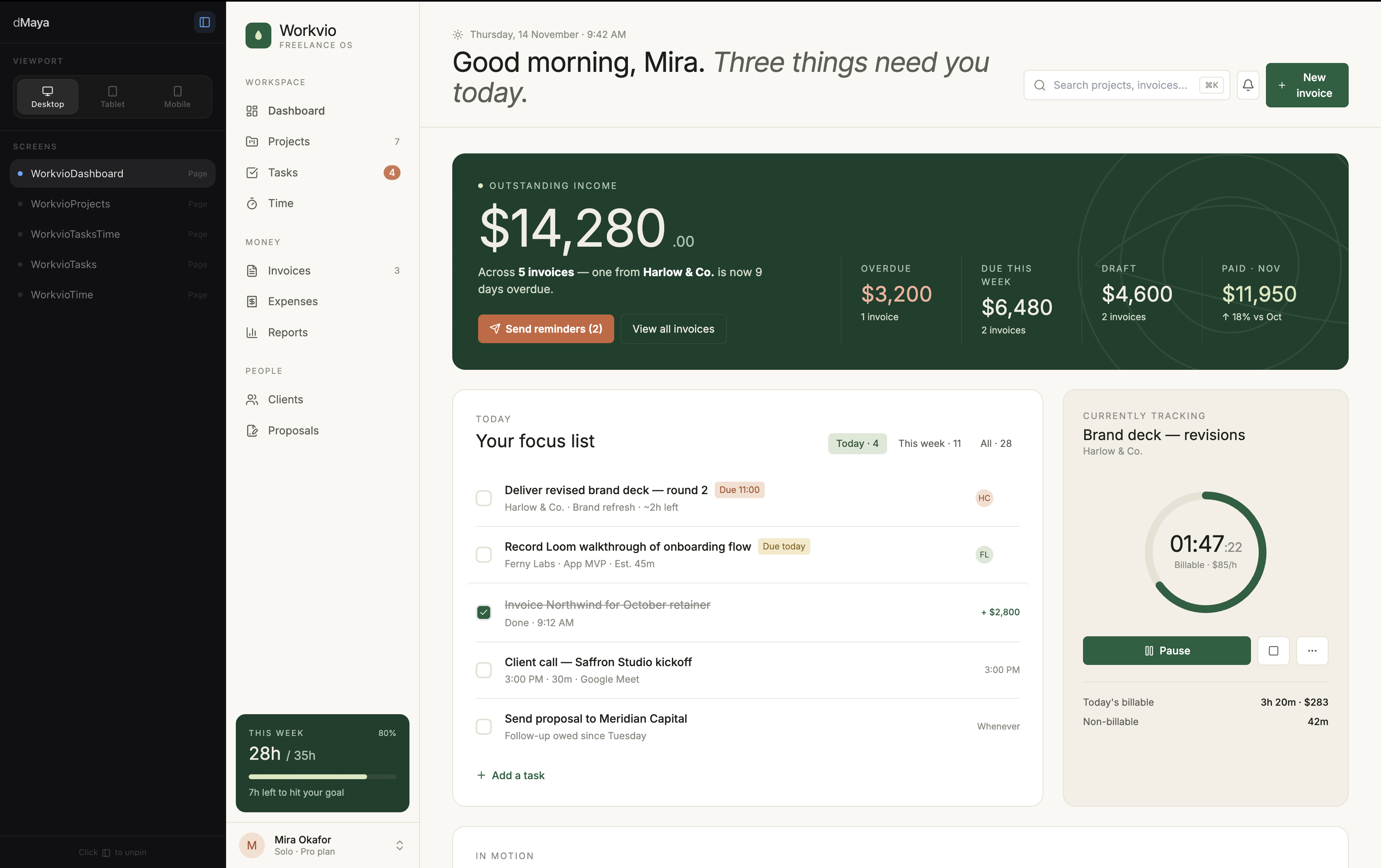
6-tool test
The Best AI Prototype Tool in 2026
Same prompt, six tools, real videos, honest ranking.
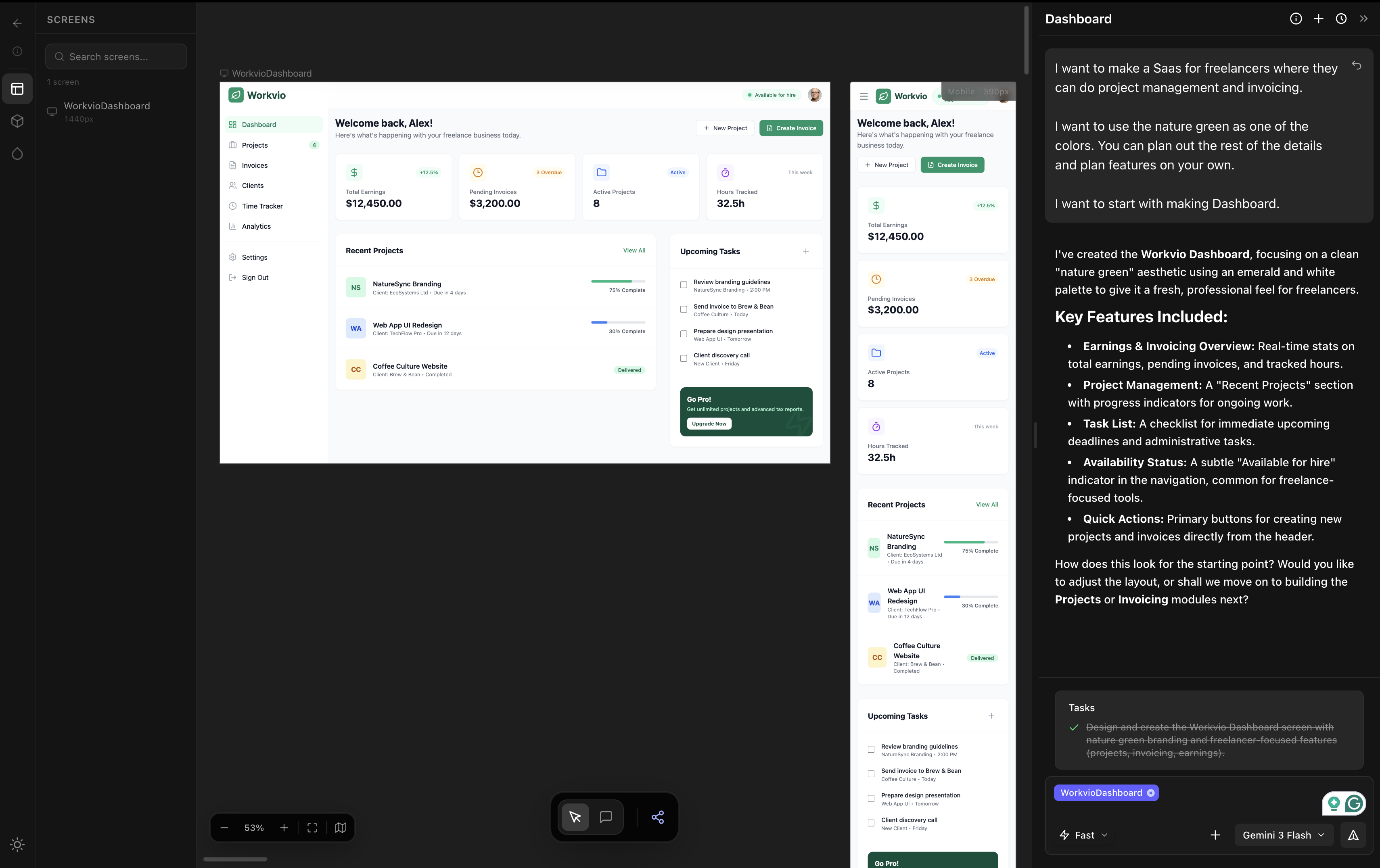
The category
Vibe Design: The Definitive 2026 Guide
Definition. 5 tools compared. Real timings.