Head-to-head · Tested April 24, 2026
Google Stitch and dMaya on the same prompt. Here's how the comparison actually lands.

What Google Stitch is
Google Stitch is an AI UI design tool from Google Labs. It launched at Google I/O 2025 and received a major overhaul on March 19, 2026 in the update that sent Figma's stock down 8% the same day. It runs on Gemini (Flash or Pro) and turns text prompts, screenshots, or sketches into single-page UI designs that export to Figma or HTML/CSS.
It is free, single-player, and single-model. As a Labs product, it has no production SLA and no commercial roadmap published. It is explicitly an experiment in what prompt-to-UI can look like, not a shipping commitment.
Strengths: free, fast, available without a credit card, and genuinely good for quick visual exploration. Weaknesses: the output is more mood-board than component system, there is no consistency enforcement across multiple screens, and you cannot pick a model other than Gemini.
What dMaya is
dMaya is a prompt-first vibe design platform built for anyone shipping real design work, from agencies and product teams to freelancers and solo builders with a strong idea. You describe what you need in plain language. A canvas fills in with a real UI design tied to a design system that stays consistent across every screen you generate after it. You iterate through chat. You share preview links. You export clean HTML for handoff to Cursor, Claude Code, or whatever coding agent your team already uses.
Model choice is the headline differentiator: Claude (Sonnet, Opus), GPT, Gemini (Flash, Pro), with open-source options like Kimi K2.6 and DeepSeek V4 rolling out. Different jobs want different models; dMaya lets you pick per generation.
Pricing: Starter $18/mo (~136 designs), Pro $48/mo (~454 designs), Scale $120/mo (~1,136 designs), all on the default model. Every plan has every feature. See the full pricing page.
At a glance
| Google Stitch | dMaya | |
|---|---|---|
| Category | Labs experiment, single-model | Commercial vibe design platform |
| Best for | Exploration, quick sketches | Shipping real client and product work |
| Pricing | Free (Labs) | $18-$120/mo |
| Model | Gemini (Flash, Pro) | Claude / GPT / Gemini / open-source |
| Export | HTML/CSS, Figma | Clean HTML for coding-agent handoff |
The same prompt, every way you can stack it
Same prompt, same day (April 24, 2026), three progressively less fair matchups for Stitch. Prompt verbatim:
“I want to make a SaaS for freelancers where they can do project management and invoicing. I want to use the nature green as one of the colors. You can plan out the rest of the details and plan features on your own. I want to start with making Dashboard.”
Round 1. Equal tier: Stitch Flash vs dMaya Flash
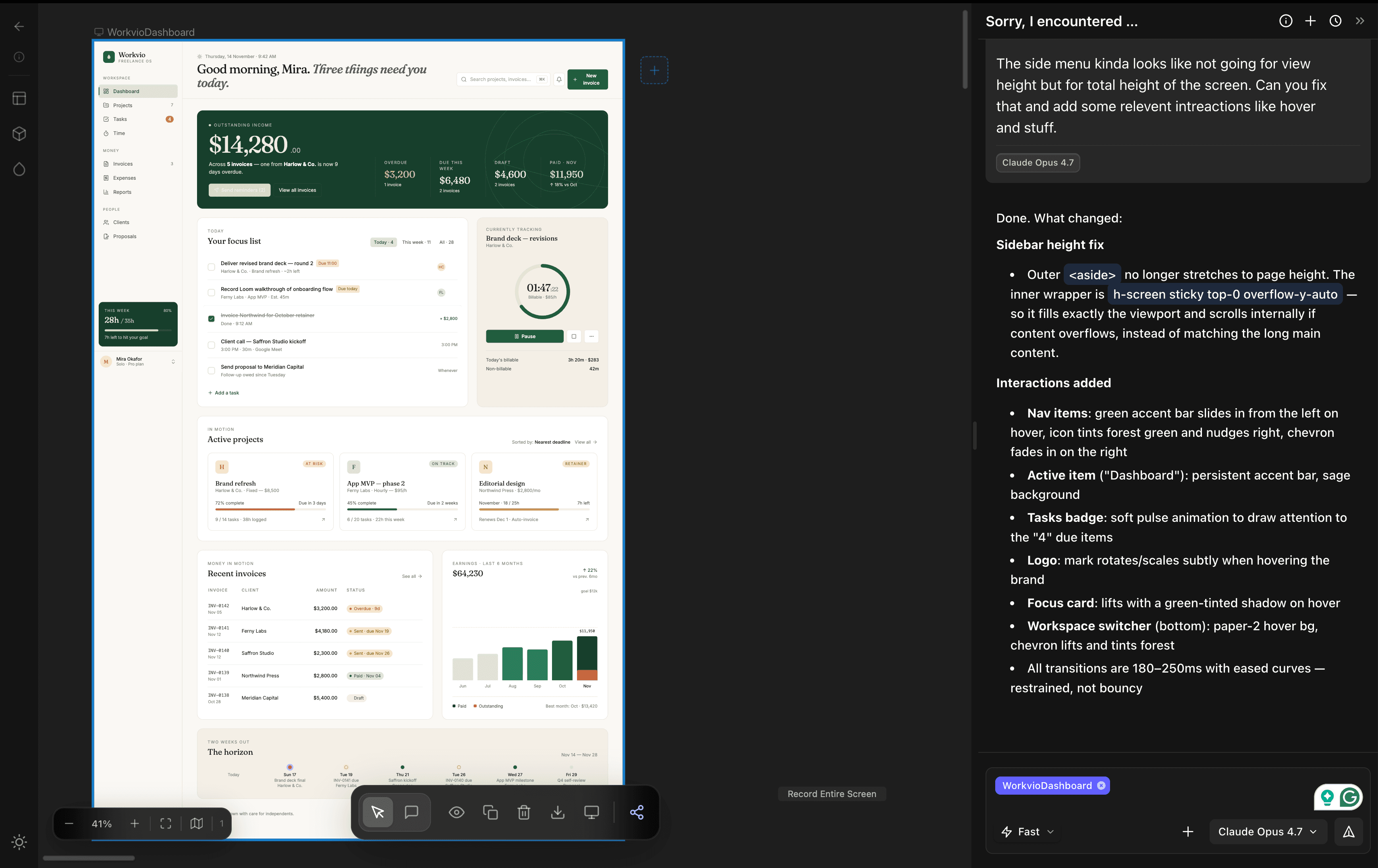
Same underlying model. dMaya's output honors the nature-green constraint, spaces components intentionally, reads like a real dashboard. Stitch's reads like a mood-board of one.
Round 2. Handicap reversed: Stitch's best model vs dMaya's cheapest
Now Stitch gets their strongest model, dMaya stays on its cheapest. dMaya's output still lands closer to shippable.
Round 3. What dMaya can actually do
When you reach for higher tiers in dMaya, the output leaves the same chart Stitch is on, because Stitch cannot run these models at all.
The original three-way walkthrough with all videos, stat strips, and decision tree lives in the three-way comparison post.
Feature-by-feature deep dive
Output quality
On our test prompt, Stitch produced a layout that looked acceptable as a thumbnail but did not hold up on inspection: unclear component hierarchy, spacing that read more like a mood board than an interface, and empty states that would not survive a real client review. dMaya's output had a clear dashboard grid, a real sidebar, usable card components, and a visual language consistent with shipping a SaaS product. On this axis, dMaya wins.
Speed
Roughly tied at the raw clock. Stitch landed in about 2 minutes, dMaya on Opus in about 2.5 minutes. dMaya on faster models (Sonnet, Gemini Flash) matches or beats Stitch's clock while holding the quality gap.
Pricing model
Stitch is free in Google Labs. dMaya uses a credit-based subscription: $18/mo Starter, $48/mo Pro ($450/yr), $120/mo Scale ($1,200/yr). Default model costs ~22 credits per design, so Starter gives ~136 designs per month. Top-ups are $6 per 1,000 credits. Every plan has every feature. Free wins on sticker price; $0.13 per usable design wins on cost per shipped output.
Model options
Stitch runs on Gemini (Flash or Pro). dMaya runs on Claude Sonnet and Opus, GPT, Gemini Flash and Pro, with Kimi K2.6, DeepSeek V4, and GPT-5.5 rolling out. The practical value: use Sonnet for the first eight iterations, Opus for the final version, Flash for throwaway exploration, and open-source for cost-sensitive bulk work. Stitch does not let you pick.
Design-system consistency
This is the load-bearing difference for multi-screen projects. dMaya holds a design system across every generation: same tokens, same components, same spacing scale. Stitch regenerates visual choices on every prompt. On a 20-screen project, Stitch's output drifts; dMaya's does not. If your deliverable is more than one screen, this is the feature that decides the comparison.
Collaboration
Stitch is single-player. dMaya is team-native with a shared canvas and client preview links that do not require the viewer to create an account. For any work that has to be reviewed by a client or a teammate, this is non-optional.
Export format
Stitch exports to HTML/CSS and Figma. dMaya exports clean HTML on purpose, so you can hand it to Cursor or Claude Code to convert into React, Flutter, React Native, or whatever your stack is. The HTML-first choice matters because an agent that already knows your codebase produces output that fits, while generic plugin React rarely does.
Iteration ergonomics
Both tools iterate through chat. dMaya's iteration edit touches the current design in place (change the sidebar, keep everything else). Stitch's iteration tends toward regeneration, which is fast but means you lose in-progress decisions more often.
Roadmap and production-readiness
Stitch is a Labs product. No SLA, no commercial roadmap, no enterprise controls. dMaya is a commercial product with a pricing page, a public roadmap around model additions, and teams paying to ship with it today.
Target user
Stitch is for individuals sketching. dMaya is for anyone shipping real design work: agencies, product teams, freelancers, and solo builders with a strong idea and no formal design training.
What the session actually feels like
Stitch feels like a machine. Input goes in, output comes out. There is no dialogue, no back-and-forth, no sense that the tool is thinking with you. You are not planning a design, you are operating a generator.
dMaya is a conversation. You describe the idea. The agent asks what you want to see. You iterate together. You can plan the information architecture out loud, change direction mid-session, argue with a choice it made. The experience is closer to working with a quick designer than to filling in a form. For anyone who has an idea but is not a trained designer, this is the difference between "the tool made something" and "I made something with the tool."
A preview built for sharing, not just rendering
When Stitch finishes a generation, the output renders inside the tool's interface. There is no separate preview surface for showing to a client, no side menu to navigate between screens of the same project, no shareable link where a stakeholder can see exactly what you see without logging in.
dMaya treats the preview as a first-class artifact. A dedicated shareable link. A side menu that lets anyone (you or a client) jump between screens in a multi-screen project. Works in any browser, no account required. The review loop that usually lives in Figma, email threads, or Loom videos all collapses into a URL.
When your idea is not a template
Stitch ships with a set of design guidance patterns. If your idea fits one of them (a clean mobile onboarding flow, a generic SaaS landing page), the output is reasonable. The moment you bring something of your own (a specific color system, an unusual layout, a domain nobody has templated yet), the quality drops.
Our test prompt is a good example. We asked for a freelancer SaaS dashboard with nature green as one of the colors. A specific constraint, a specific domain, not somebody's template. Stitch's output did not reflect the constraint well. dMaya's did, because dMaya is not trying to match your prompt to a pattern; it is trying to build what you asked for.
This is the gap you feel on the second or third custom project, after the novelty wears off.
The philosophy: lift the skill layer
The deeper difference is about what the tool is for. Stitch is a generator, in the literal sense: a thing that turns a prompt into a picture.
dMaya's bet is that a lot of people have ideas worth shipping and do not have the formal design training to execute them cleanly. The tool lifts the skill layer. You still think, plan, research, argue with yourself about the right direction, and decide. dMaya handles the craft side, the visual grammar, the consistency across screens, the design-system scaffolding. You stay the author. The tool is the skilled collaborator you did not have access to before.
That framing flips what the comparison is really about. Stitch asks "can the AI make a design?" dMaya asks "can a person with an idea make the design they actually wanted?" Those are different products.
When to pick Google Stitch
- You are exploring an idea visually with no deliverable attached.
- Cost sensitivity is absolute: you need something free today, no subscription.
- You will use the output as input to a Figma workflow rather than as a handoff to development.
- You are comfortable starting over on every iteration.
When to pick dMaya
- You have a client, stakeholder, or teammate who needs to approve the design.
- Your project has more than a few screens and needs visual consistency.
- You want to pick the underlying model to fit the job.
- You ship to production through a coding agent (Cursor, Claude Code, Bolt).
- You want a commercial product with a pricing page and a roadmap, not a Labs experiment.
“It's like great idea meets great tool.”
Switching notes
There is no file import to worry about. dMaya is prompt-first, so moving from Stitch usually means bringing the same prompt and re-running it. Most teams find the prompt alone carries enough intent that the first dMaya design lands inside the first fifteen minutes of a new account. If you want the longer version of this path, see the Google Stitch alternative guide.
Frequently Asked Questions
Run the same prompt in dMaya
Pick a model. Watch the canvas fill in. Export clean HTML. See the difference yourself.
Start Designing